Lulu ATM Balance Inquiry — Supported ATMs Guide UAE
Need to check your Lulu salary card balance but don’t have your phone or internet? ATMs are everywhere in the UAE, and they’re one of the most reliable ways to check your balance. No app, no SMS, no login — just your card and a few taps. Here’s exactly how to do it.
Safety Note: UAEfinbiz is an informational guide only and does not have access to your Lulu card or account. Never share your card number, PIN, OTP, or Emirates ID with anyone. When using an ATM, always shield the keypad when entering your PIN to protect against skimming devices. Only use official bank ATMs — preferably those supported by Lulu Exchange — and avoid ATMs in isolated or poorly lit areas. For verified information, visit the official Lulu Money website at lulumoney.com . Lulu Exchange will never ask for your PIN outside of an ATM or their official channels.
Why Use an ATM for Balance Check?
ATMs are everywhere in the UAE — shopping malls, supermarkets, petrol stations, and bank branches. They’re open 24/7, require no internet or phone, and give you an instant, accurate balance.
Plus, if you need proof of your balance, you can print a receipt. That’s something you can’t do with SMS or the app.
Which ATMs Support Lulu Salary Cards?
Lulu “My Pay My Card” salary cards are Mastercard cards, which means they work at most ATMs across the UAE . Here’s a breakdown:
| ATM Network | Supported? | Notes |
|---|---|---|
| Lulu Exchange Branch ATMs | ✅ Yes | Inside Lulu Exchange branches |
| Emirates NBD (ENBD) | ✅ Yes | Widely available across UAE |
| Emirates Islamic | ✅ Yes | Many locations |
| Mashreq Bank | ✅ Yes | Common in malls and areas |
| FAB | ✅ Yes | Most FAB ATMs accept Mastercard |
| RAKBank | ✅ Yes | Many locations |
| Other UAE ATMs | ✅ Yes | Most accept Mastercard |
Important: Check for the Mastercard logo on the ATM — if it’s there, your Lulu card should work.
Step-by-Step Guide
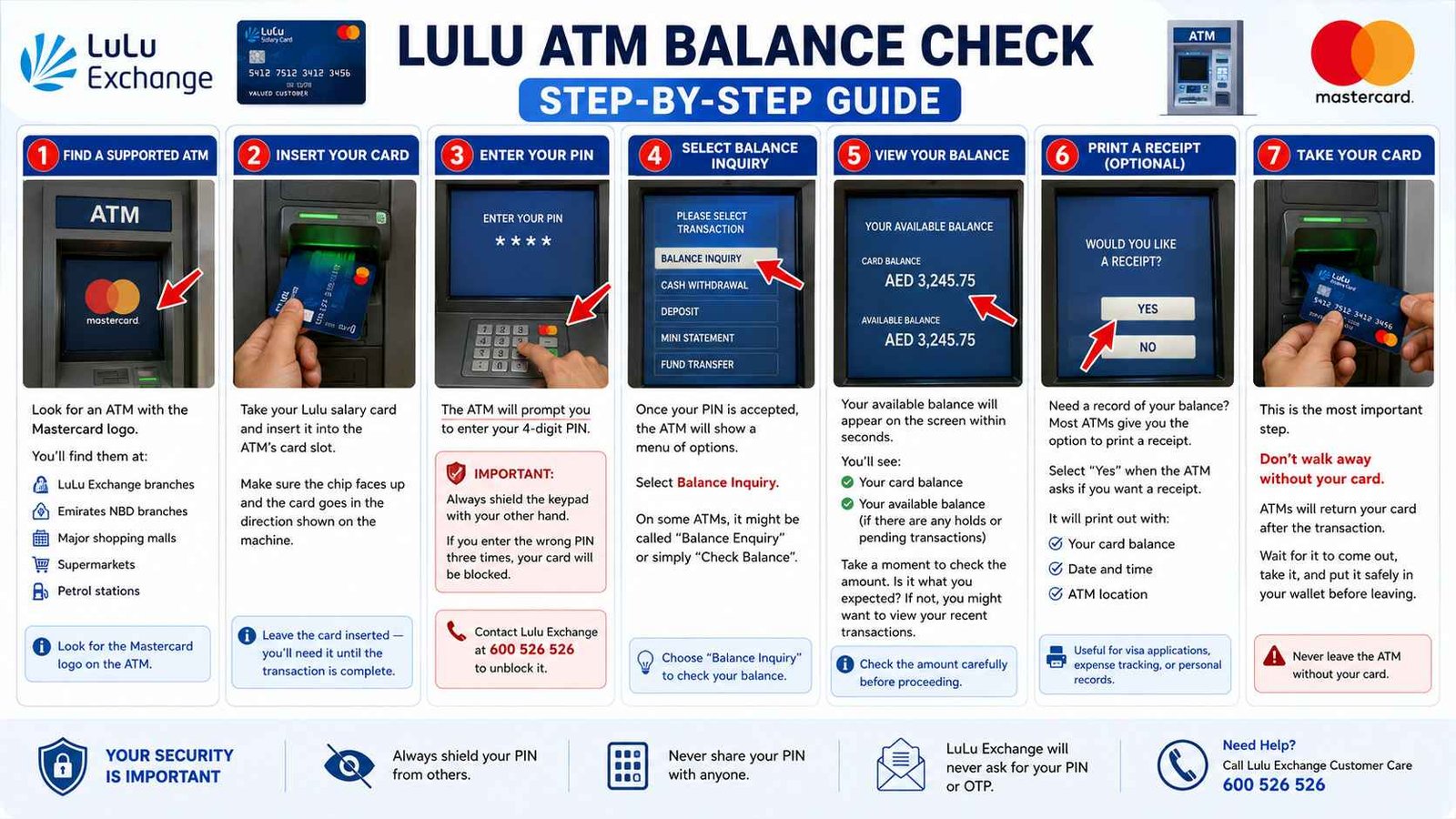
Step 1: Find a Supported ATM
Look for an ATM with the Mastercard logo . You’ll find them at:
- Lulu Exchange branches
- Emirates NBD branches
- Major shopping malls
- Supermarkets
- Petrol stations
Step 2: Insert Your Card
Take your Lulu salary card and insert it into the ATM’s card slot. Make sure the chip faces up and the card goes in the direction shown on the machine.
Leave the card inserted — you’ll need it until the transaction is complete.
Step 3: Enter Your PIN
The ATM will prompt you to enter your 4-digit PIN. Do this carefully.
Important: Always shield the keypad with your other hand. This prevents anyone from seeing your PIN, whether it’s a person standing nearby or a hidden camera.
If you enter the wrong PIN three times, your card will be blocked. If that happens, you’ll need to contact Lulu Exchange at 600 526 526 to unblock it.
Step 4: Select Balance Inquiry
Once your PIN is accepted, the ATM will show a menu of options. These usually include:
- Balance Inquiry
- Cash Withdrawal
- Deposit
- Mini Statement
- Fund Transfer
Select Balance Inquiry. On some ATMs, it might be called “Balance Enquiry” or simply “Check Balance”.
Step 5: View Your Balance
Your available balance will appear on the screen within seconds. You’ll see:
- Your card balance
- Your available balance (if there are any holds or pending transactions)
Take a moment to check the amount. Is it what you expected? If not, you might want to view your recent transactions.
Step 6: Print a Receipt (Optional)
Need a record of your balance? Most ATMs give you the option to print a receipt.
Select “Yes” when the ATM asks if you want a receipt. It will print out with:
- Your card balance
- Date and time
- ATM location
This is useful for visa applications, expense tracking, or just for your personal records.
Step 7: Take Your Card
This is the most important step. Don’t walk away without your card.
ATMs will return your card after the transaction. Wait for it to come out, take it, and put it safely in your wallet before leaving.
Using Other Bank ATMs
Don’t worry if you can’t find a Lulu Exchange branch ATM. You can use most ATMs in the UAE — whether it’s Emirates NBD, FAB, Mashreq, or any other bank.
Here’s what to expect:
- Fees: Other ATMs may charge AED 1–2 per balance inquiry
- Wait time: It might take a few extra seconds, but it works the same way
- Language: Most ATMs offer both English and Arabic
- Acceptance: As long as the ATM displays the Mastercard logo, your Lulu card will work
Troubleshooting
Card not being accepted?
- Make sure the ATM accepts Mastercard — look for the logo on the machine
- Check that the chip is clean and facing the right direction
- Try wiping the chip gently with a cloth
- Your card might be expired — check the expiry date
PIN not working?
- Make sure you’re entering the right 4-digit number
- If you’ve forgotten it, you’ll need to request a new PIN through the Lulu Money app or by calling 600 526 526
ATM says “Insufficient Balance”?
- This usually means you don’t have enough for the transaction you’re trying to make
- For balance checks only, it should always work — there’s no cost
ATM swallowed your card?
- Stay calm. Cards get retained sometimes — usually for security reasons
- Don’t leave the area — call the ATM’s bank immediately
- For Lulu Exchange cards, call 600 526 526 and report it
Charges
Checking your balance at a Lulu Exchange branch ATM is completely free. No charges apply.
Using other bank ATMs for balance inquiry may cost AED 1–2 per attempt, depending on the bank’s policy.
Frequently Asked Questions
Can I check my Lulu salary card balance at any ATM?
Yes — as long as the ATM accepts Mastercard. Most ATMs in the UAE do. Check for the Mastercard logo on the machine.
Can I use my Lulu card at Emirates NBD ATMs?
Yes — Lulu cards work at Emirates NBD ATMs. Just look for the Mastercard logo.
Is there a charge for checking my balance at an ATM?
Free at Lulu Exchange branch ATMs. Other ATMs may charge AED 1–2 per inquiry.
What if I forget my PIN?
You can reset your PIN through the Lulu Money app, or visit any Lulu Exchange branch with your Emirates ID to reset it.
Can I withdraw cash using my Lulu card at any ATM?
Yes — you can withdraw cash at any ATM that displays the Mastercard logo. Withdrawal fees may apply at other bank ATMs.
My card got stuck in an ATM. What should I do?
Don’t leave the area. Call the ATM’s bank immediately. For FAB ATMs, call 600 525 500. For Lulu Exchange issues, call 600 526 526.
ATM vs Other Methods
| Situation | Best Method |
|---|---|
| Need a printed receipt | ATM |
| No phone or internet | ATM |
| Quick check on the go | Lulu Money App |
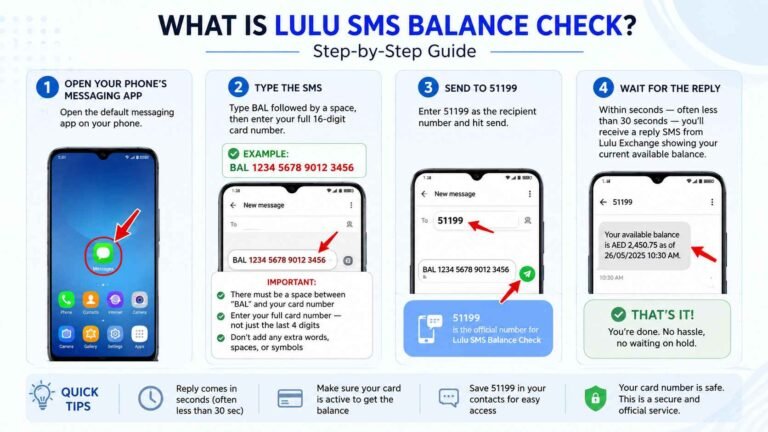
| No card with you | SMS BAL to 51199 |
| Need detailed transaction history | Lulu Money App |