CentiV Card (KamelPay) Balance Check — Complete Guide UAE
You have a CentiV card from KamelPay. Your salary just came in. And now you need to know exactly how much is on it, before you withdraw cash, pay bills, or make purchases.
Here is what makes the CentiV card different from other UAE salary cards. It is issued by KamelPay, a UAE-based fintech company, in partnership with Mastercard. That means it is an open-loop Mastercard, so you can use it almost anywhere, not just at specific ATMs or branches . But to avoid unnecessary fees, you need to know the right ways to check your balance.
Safety Note: UAEfinbiz is an informational guide only and does not have access to your CentiV card or account. Never share your card number, PIN, OTP, Emirates ID, or login credentials with any third-party website or individual. Always use official KamelPay channels for balance checks. For verified information, visit the official KamelPay website at www.kamelpay.com. KamelPay will never ask for your PIN or OTP outside of their official app or verified channels. If you receive any suspicious messages, ignore them and report immediately.
What is the CentiV Card?
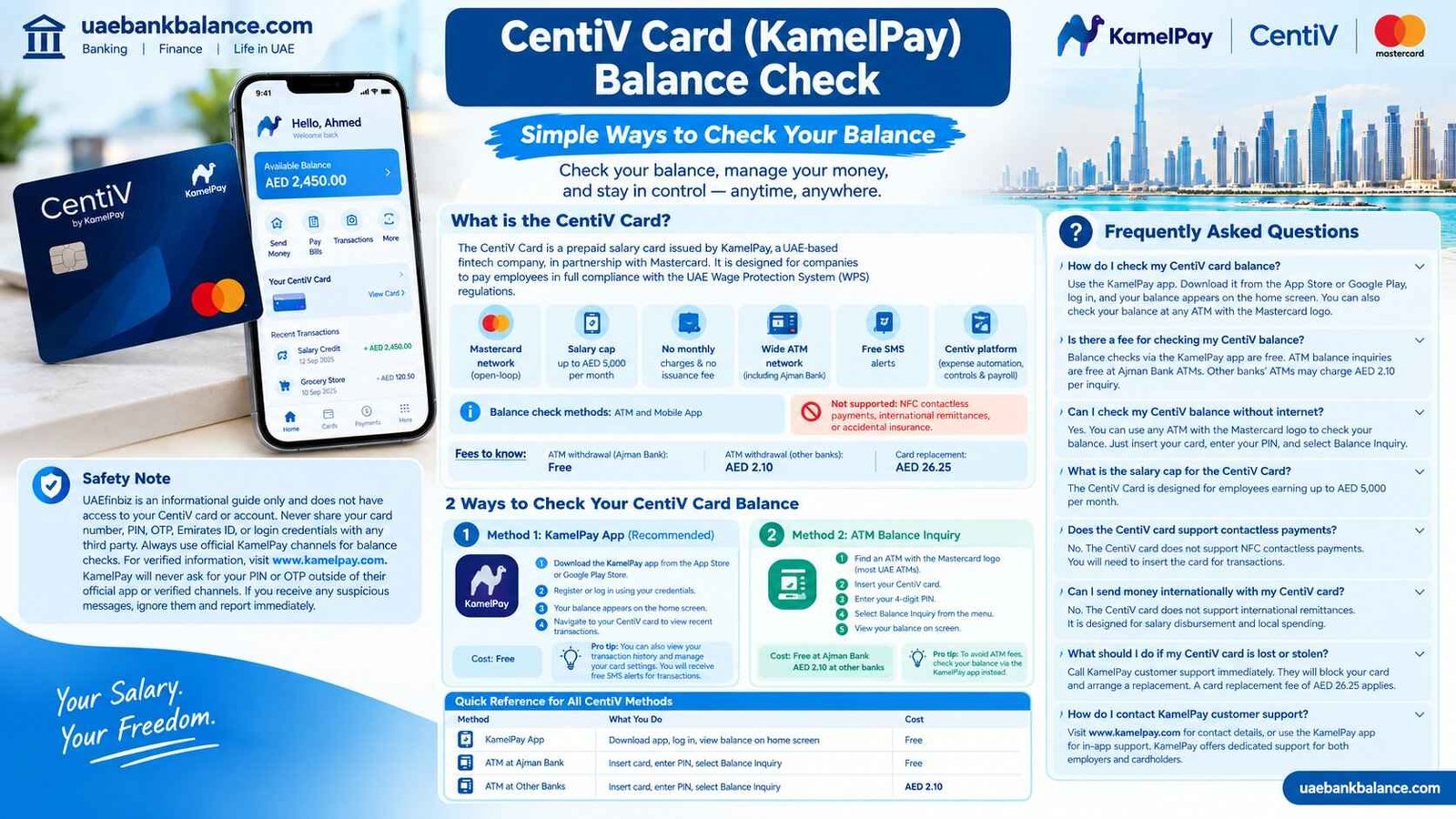
The CentiV Card is a prepaid salary card issued by KamelPay, a UAE-based fintech company, in partnership with Mastercard. It is designed for companies to pay their employees in full compliance with the UAE Wage Protection System (WPS) regulations .
Key features include Mastercard network access, which means it works globally wherever Mastercard is accepted . The salary cap is up to AED 5,000 per month . There are no monthly charges and no issuance fee . You get access to a wide ATM network including Ajman Bank ATMs . Free SMS alerts keep you informed about transactions . The card also integrates with the Centiv platform for expense automation, advanced controls, and seamless payroll integration . Balance check methods include ATM and Mobile App .
Fees to know: ATM withdrawal at Ajman Bank network is free. ATM withdrawal at other banks costs AED 2.10. Card replacement costs AED 26.25 .
Important: The CentiV card does not support NFC contactless payments, international remittances, or accidental insurance .
2 Ways to Check Your CentiV Card Balance
Method 1: KamelPay App (Recommended)
The KamelPay app is the fastest and most convenient way to check your balance. It is free, available 24/7, and works from anywhere .
Here is how to check. Download the KamelPay app from the App Store for iPhone or Google Play Store for Android. Register or log in using your credentials. Your balance appears on the home screen after login. Navigate to your CentiV card to view recent transactions.
Cost: Free.
Pro tip: The KamelPay app also lets you view your transaction history and manage your card settings. You will also receive free SMS alerts for transactions, giving you another layer of visibility .
Method 2: ATM Balance Inquiry
ATMs are everywhere in the UAE and available 24/7. CentiV cards work at a wide network of ATMs .
Here is how to check. Find an ATM with the Mastercard logo, which most UAE ATMs have. Insert your CentiV card. Enter your 4-digit PIN. Select Balance Inquiry from the menu. View your balance on screen.
Cost: Free at Ajman Bank ATMs. AED 2.10 at other banks’ ATMs .
Pro tip: To avoid ATM fees, check your balance via the KamelPay app instead. It is free and instant.
Quick Reference for All CentiV Methods
| Method | What You Do | Cost |
|---|---|---|
| KamelPay App | Download app, log in, view balance on home screen | Free |
| ATM at Ajman Bank | Insert card, enter PIN, select Balance Inquiry | Free |
| ATM at Other Banks | Insert card, enter PIN, select Balance Inquiry | AED 2.10 |
Frequently Asked Questionstions
How do I check my CentiV card balance?
Use the KamelPay app. Download it from the App Store or Google Play, log in, and your balance appears on the home screen. You can also check your balance at any ATM with the Mastercard logo.
Is there a fee for checking my CentiV balance?
Balance checks via the KamelPay app are completely free. ATM balance inquiries are free at Ajman Bank ATMs. Other banks’ ATMs may charge AED 2.10 per inquiry.
Can I check my CentiV balance without internet?
Yes. You can use any ATM with the Mastercard logo to check your balance. Just insert your card, enter your PIN, and select Balance Inquiry.
What is the salary cap for the CentiV Card?
The CentiV Card is designed for employees earning up to AED 5,000 per month.
Does the CentiV card support contactless payments?
No. The CentiV card does not support NFC contactless payments. You will need to insert the card for transactions.
Can I send money internationally with my CentiV card?
No. The CentiV card does not support international remittances. It is designed for salary disbursement and local spending.
What should I do if my CentiV card is lost or stolen?
Call KamelPay customer support immediately. They will block your card and arrange a replacement. A card replacement fee of AED 26.25 applies.
How do I contact KamelPay customer support?
Visit www.kamelpay.com for contact details, or use the KamelPay app for in-app support. KamelPay offers dedicated support for both employers and cardholders.
Related Guides
- UAE Salary Card Balance Check — Complete Guide by Provider
- ADIB WPS Salary Card Balance Check — Complete Guide UAE
- Emirates NBD Salary Prepay Card Balance Check — Complete Guide UAE
- FAB Balance Check Online UAE — Complete Guide
- Lulu Salary Card Balance Check — Complete Guide UAE
- RPay Salary Card Balance Check — Complete Guide UAE
- Al Ansari PayPlus Salary Card Balance Check — Complete Guide UAE
- Payez Salary Card Balance Check — Complete Guide UAE
- C3Pay Salary Card Balance Check — Complete Guide UAE