
FAB Balance Check Online UAE — Complete Guide
FAB Balance Check Online UAE — Complete Guide
Need to check your FAB balance but not sure which method works for you? It depends on what type of account or card you have. A regular FAB bank account works differently from a Ratibi salary card or a Magnati prepaid card. This guide walks you through every single option — so you always know exactly where to go.
Safety Note: UAEfinbiz is an informational website only. We do not have access to your FAB account or any banking details. Never share your PIN, OTP, card number, Emirates ID, or login information with any unofficial website or person. Always use verified FAB channels for checking your balance. The official FAB website is www.bankfab.com , and the Magnati portal for prepaid cards is ppc.magnati.com/ppc-inquiry . FAB will never ask for your PIN or OTP outside of their official apps or verified phone number (600 525 500). If you receive any suspicious messages, ignore them and report immediately.
Find Your Card Type — Pick the Right Method
Different cards use different systems. Choose yours from the list below.
FAB Account — Regular Bank Accounts
This covers standard FAB savings accounts, current accounts, and debit cards that are linked to a bank account.
Ways to check your balance:
- FAB Mobile app — balance appears right after you log in
- Online banking — visit bankfab.com
- SMS — text BAL to 6667 from your registered UAE number
- Phone banking — call 600 525 500
- ATM — any FAB ATM will show your balance
- WhatsApp — FAB’s official WhatsApp channel
Detailed guides for each method:
- FAB Mobile App Balance Check — Step by Step Guide UAE — Full walkthrough for the app
- FAB SMS Balance Check — BAL to 6667 Full Guide — How to use SMS for balance enquiries
- FAB Online Banking Balance Check — bankfab.com Guide UAE — Full guide for desktop users
- FAB ATM Balance Inquiry — Full Guide UAE — Step-by-step ATM instructions
- FAB Phone Banking Number — 600 525 500 Balance Check UAE — How to check balance by phone
FAB Salary Card / Ratibi — Payroll Cards
Ratibi cards are prepaid salary cards issued through FAB’s subsidiary Magnati. They are not connected to the FAB Mobile app.
Ways to check your balance:
- Magnati online portal — ppc.magnati.com/ppc-inquiry
- SMS — send BAL to 6667
- ATM — any UAE ATM will work
- Phone banking — call 600 525 500
Detailed guide:
- Ratibi Salary Card Balance Check — Full Guide UAE — Complete guide for Ratibi cardholders
Magnati Prepaid Card / PPC
Magnati PPC cards are similar to Ratibi cards but may be issued for different purposes. The same balance-check methods apply.
Ways to check your balance:
- Magnati enquiry portal — ppc.magnati.com/ppc-inquiry
- ATM — balance enquiry at any UAE ATM
- Phone — call 800 624 6284 for Magnati support
Detailed guide:
- Ratibi Salary Card Balance Check — Full Guide UAE — Same Magnati portal process applies
NBAD Legacy Cards — What Changed After the Merger
FAB took over NBAD in 2017. If you still hold an NBAD card or account, it has already been migrated to FAB. You can no longer use NBAD apps or phone numbers.
What you should do now:
- For bank accounts: Use the FAB Mobile app or online banking
- For prepaid cards: Use the Magnati portal, SMS, ATM, or phone banking
Your NBAD card will still work at ATMs. For online access, you’ll need to register with FAB.
FAB Account Balance Check — All Available Methods
If you have a regular FAB bank account, here’s how you can check your balance.
FAB Mobile App — Step by Step
The FAB Mobile app is the easiest and fastest way to check your balance from anywhere.
How it works:
- Download the app from the App Store (iPhone) or Google Play (Android)
- Register using your Emirates ID and mobile number, or log in if you already have an account
- Your balance shows up on the home screen right after login
- Tap your account to see recent transactions
Cost: Free (your mobile data charges may apply)
For a complete walkthrough with screenshots and troubleshooting tips, read the full guide:
FAB Mobile App Balance Check — Step by Step Guide UAE
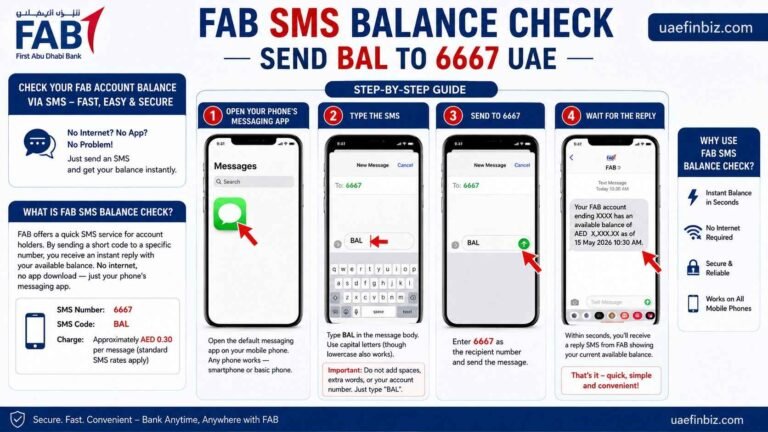
SMS Balance Check — BAL to 6667
No smartphone or internet? No worries. Just send a simple text message.
How it works:
- Open your phone’s messaging app
- Type BAL
- Send it to 6667
- You’ll get an instant reply with your available balance
Cost: Around AED 0.30 per SMS (standard SMS rates)
For more details on charges, troubleshooting, and who can use this service, check the full guide:
FAB SMS Balance Check — BAL to 6667 Full Guide
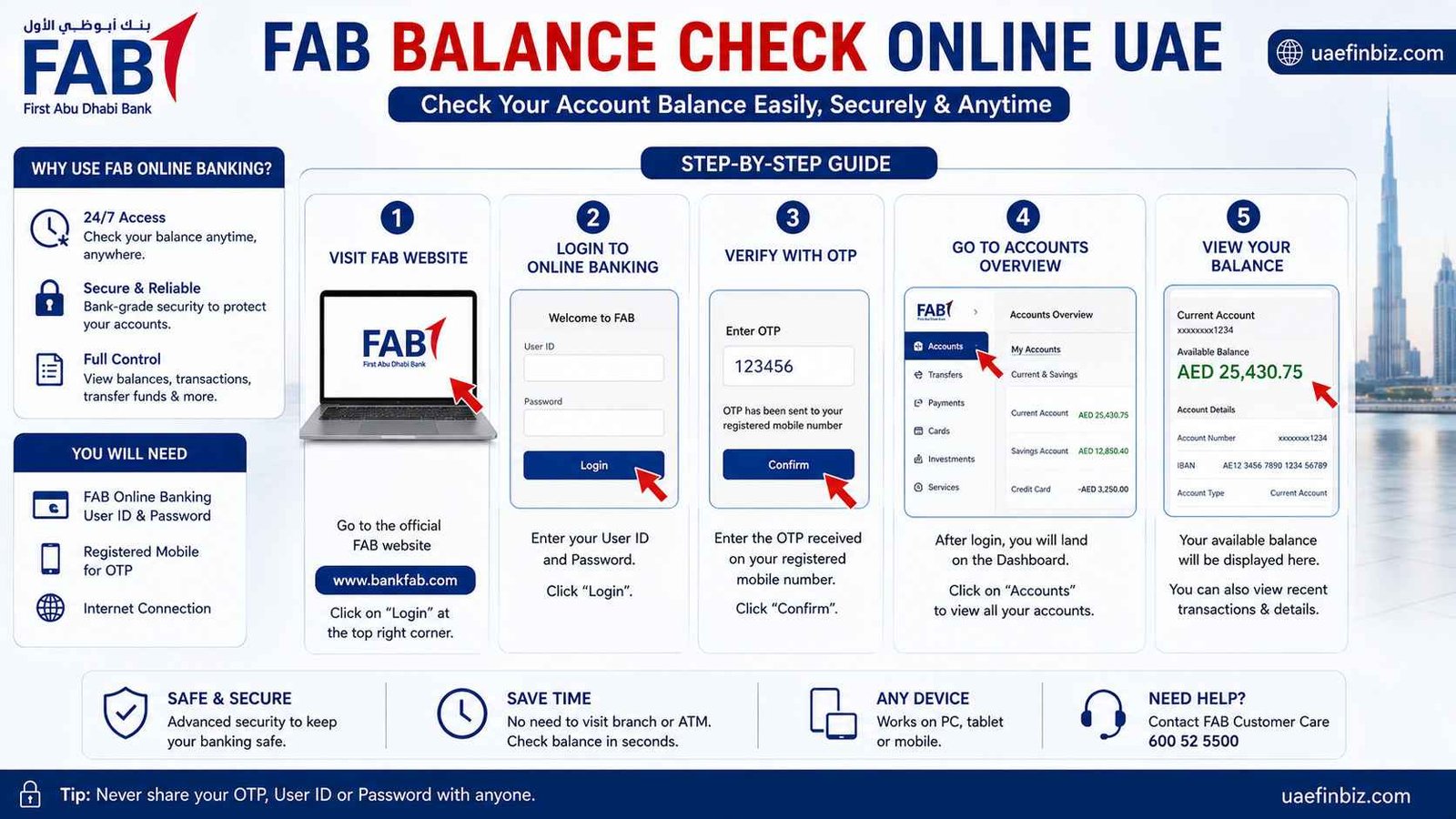
Online Banking — bankfab.com
Prefer using a computer? FAB’s online banking portal gives you full access to your accounts.
How it works:
- Go to bankfab.com
- Click Login and choose Personal Banking
- Enter your username and password
- Enter the OTP sent to your registered mobile number
- Your balance appears on the main dashboard
Cost: Free
Learn how to register, reset your password, and troubleshoot login issues in the full guide:
FAB Online Banking Balance Check — bankfab.com Guide UAE
ATM Balance Inquiry
ATMs are everywhere in the UAE and work 24 hours a day, 7 days a week.
How it works:
- Insert your FAB card into any ATM in the UAE
- Enter your 4-digit PIN
- Select “Balance Inquiry” from the menu
- Your balance shows on screen — you can also print a receipt
Cost: Free at FAB ATMs. Other ATMs may charge AED 1–2.
For a complete walkthrough, including what to do if your card gets stuck, read the full guide:
FAB ATM Balance Inquiry — Full Guide UAE
Phone Banking — 600 525 500
Sometimes you just want to talk to someone. FAB’s phone banking service is available around the clock.
How it works:
- Call 600 525 500
- Choose your language (1 for Arabic, 2 for English)
- Enter your card or account number
- Enter your phone banking PIN
- Listen to your balance being read out
- You can also say “Agent” to speak to a real person
Cost: Standard call rates apply (no extra bank fees)
Find out how to set up your phone banking PIN and what to do if you forget it in the full guide:
FAB Phone Banking Number — 600 525 500 Balance Check UAE
WhatsApp Banking
FAB also offers banking services through WhatsApp. It’s quick and convenient.
How it works:
- Save FAB’s official WhatsApp number to your contacts
- Send a message to start the conversation
- Follow the prompts to confirm your identity
- Request your balance
Cost: Free (WhatsApp data charges may apply)
FAB Salary Card / Ratibi Balance Check — All Available Methods
If you have a Ratibi card or any FAB salary card, the FAB Mobile app and online banking won’t work for you. Here’s what does.
Magnati Online Portal — ppc.magnati.com
The Magnati portal is the official way to check your Ratibi card balance online. No login is required.
How it works:
- Go to ppc.magnati.com/ppc-inquiry
- Enter the last two digits of your 16-digit card number
- Enter your Card ID — the 13-digit number on the back of your card
- Complete the captcha
- Click “Go” — your balance and transaction history will appear
Cost: Free
For a detailed walkthrough, common errors, and what to do if the portal isn’t working, check the full guide:
Ratibi Salary Card Balance Check — Full Guide UAE
SMS Balance Check — BAL to 6667
Ratibi cardholders can also use SMS. It works exactly the same as for regular accounts.
How it works:
- Open your messaging app
- Type BAL
- Send to 6667
- Get your balance via text message
Cost: Around AED 0.30 per SMS
ATM Balance Inquiry
You can check your Ratibi balance at any ATM in the UAE.
How it works:
- Insert your Ratibi card into any ATM
- Enter your 4-digit PIN
- Select “Balance Inquiry”
- View your balance on the screen
Cost: Free at FAB ATMs
Phone Banking — 600 525 500
Calling FAB’s phone banking number works for Ratibi cards too.
How it works:
- Call 600 525 500
- Follow the voice prompts
- Enter your Ratibi card number
- Enter your phone banking PIN
- Listen to your balance
Cost: Standard call rates apply
NBAD Balance Enquiry — What Changed
FAB took over NBAD in 2017. If you’re still using an NBAD card, here’s what you need to know.
NBAD Account Holders — What to Do Now
All NBAD accounts have been moved to FAB. The old NBAD apps and phone numbers no longer work.
For regular bank accounts:
- Use the FAB Mobile app
- Use FAB online banking at bankfab.com
- Use SMS BAL to 6667
- Use ATM or phone banking
For prepaid salary cards:
- Use the Magnati portal at ppc.magnati.com/ppc-inquiry
- Use SMS BAL to 6667
- Use ATM or phone banking
Your NBAD card will still work at ATMs. For online and app access, you’ll need to register with FAB.
Quick Reference Table
| Method | What You Do | Who Can Use |
|---|---|---|
| FAB Mobile App | Download the app and log in | Regular accounts only |
| SMS | Text BAL to 6667 | All FAB accounts and cards |
| Phone Banking | Call 600 525 500 | All FAB accounts and cards |
| Online Banking | Visit bankfab.com and log in | Regular accounts only |
| ATM | Insert your card, enter PIN, select balance inquiry | All FAB accounts and cards |
| Message FAB’s official number | Regular accounts | |
| Magnati Portal | Go to ppc.magnati.com/ppc-inquiry | Ratibi and Magnati cards |
Frequently Asked Questions
How can I check my FAB salary card balance online?
Head over to the official Magnati portal at ppc.magnati.com/ppc-inquiry. You’ll need your card number and Card ID. There’s no login required. Alternatively, sending BAL to 6667 via SMS also works. For full details, see our Ratibi Salary Card Balance Check guide.
What number do I call to check my FAB balance?
Dial 600 525 500 to reach FAB’s phone banking service. It’s available round the clock for automated balance enquiries. Learn more in our Phone Banking guide.
Does NBAD balance check work the same way as FAB?
Not anymore. Since FAB took over NBAD in 2017, all the old NBAD numbers and apps have been shut down. You’ll need to use FAB’s methods now for any accounts or cards that were originally with NBAD.
Can UAEfinbiz access my FAB account?
No — absolutely not. UAEfinbiz is purely an information website. We do not have access to any bank accounts or cards. Always stick to official FAB channels for checking your balance.
My salary was credited but my FAB balance hasn’t changed. Why?
It usually takes 24 to 48 hours for WPS salary payments to show up in your account. Give it a couple of business days. If it still hasn’t updated, get in touch with FAB at 600 525 500 or speak to your HR department.
Does FAB charge for SMS balance checks?
Yes — around AED 0.30 per text message. Your mobile operator deducts this from your prepaid credit or adds it to your monthly bill. See our SMS Balance Check guide for full details.
Is there a way to check my balance without internet?
Definitely. You can use the SMS method (send BAL to 6667), visit any ATM, or call 600 525 500 through phone banking. All of these work without an internet connection.
Can I see my Ratibi balance through the FAB Mobile app?
No — Ratibi cards are prepaid salary cards and aren’t connected to the FAB Mobile app. You’ll need to use the Magnati portal, SMS, ATM, or phone banking instead. Our Ratibi Card guide explains all the options.
One Comment