FAB Phone Banking Number — 600 525 500 Balance Check UAE
Sometimes you just want to talk to a real person. Or maybe you’re driving, or you don’t have your card with you, or you just prefer using your phone the old-fashioned way. FAB’s phone banking service at 600 525 500 lets you check your balance, hear recent transactions, and get help — all without stepping into a branch or opening an app. Here’s everything you need to know.
Safety Note: UAEfinbiz is an informational guide only and does not have access to your FAB account. Never share your card number, PIN, OTP, Emirates ID, or any personal banking details with anyone who calls you claiming to be from FAB. Always dial the official FAB phone banking number — 600 525 500 — yourself. Do not call back missed calls claiming to be from FAB or click on links sent via SMS. Scammers often spoof bank numbers. If in doubt, hang up and call the official number directly. For verified information, visit the official FAB website at www.bankfab.com . FAB will never ask for your PIN or OTP over the phone unless you have called them.
What is FAB Phone Banking?
FAB Phone Banking is exactly what it sounds like — banking services delivered over the phone. You call a number, follow some voice instructions, and get your balance read out to you. Or, if you prefer, you can skip the automated system and speak directly to a customer service agent.
Think of it as your bank branch in your pocket, except you’re using your voice instead of tapping a screen.
Phone Number: 600 525 500
Availability: 24/7 for automated services
Agent Hours: Sunday to Thursday, 8 AM to 8 PM (UAE time)
Charges: Standard call rates apply — no additional bank fees
Step-by-Step Guide
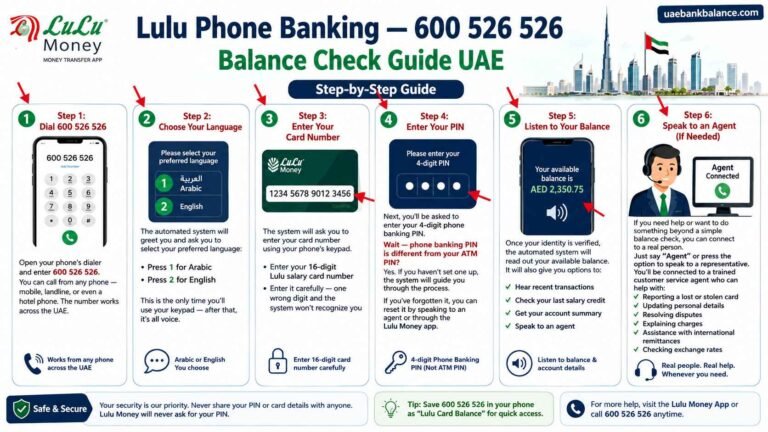
Step 1: Dial 600 525 500
Open your phone’s dialer and enter 600 525 500. You can call from any phone — mobile, landline, or even a hotel phone. The number works across the UAE.
Step 2: Choose Your Language
The automated system will greet you and ask you to select your preferred language:
- Press 1 for Arabic
- Press 2 for English
This is the only time you’ll use your keypad — after that, it’s all voice.
Step 3: Enter Your Card or Account Number
The system will ask you to enter your card number or account number using your phone’s keypad.
- For balance check, use your 16-digit FAB card number or your account number
- Enter it carefully — one wrong digit and the system won’t recognize you
Step 4: Enter Your PIN
Next, you’ll be asked to enter your 4-digit phone banking PIN.
Wait — phone banking PIN is different from your ATM PIN? Yes. If you haven’t set one up, the system will guide you through the process.
If you’ve forgotten it, you can reset it by speaking to an agent or through the FAB Mobile app.
Step 5: Listen to Your Balance
Once your identity is verified, the automated system will read out your available balance. It will also give you options to:
- Hear recent transactions
- Check your last salary credit
- Get your account summary
- Speak to an agent
Step 6: Speak to an Agent (If Needed)
If you need help or want to do something beyond a simple balance check, you can connect to a real person.
Just say “Agent” or press the option to speak to a representative. You’ll be connected to a trained customer service agent who can help with:
- Reporting a lost or stolen card
- Updating personal details
- Transferring money
- Explaining charges
- Resolving disputes
What You Can Do Through Phone Banking
Phone banking is surprisingly powerful. Here’s what you can do without visiting a branch:
- Check account balance
- Hear recent transactions
- Transfer money between your FAB accounts
- Pay utility bills (DEWA, Etisalat, Du)
- Block and unblock your card
- Request a cheque book
- Change your PIN
- Update your phone number
- Report a lost card
- Get clarification on bank charges
Do You Need to Register?
Yes and no.
- Automated balance check: You just need your card number and PIN. No registration required.
- Speaking to an agent: They’ll ask you security questions to verify your identity — usually your Emirates ID or date of birth.
For ongoing use, it’s a good idea to set up your phone banking PIN. You can do this through the FAB Mobile app or by speaking to an agent.
Troubleshooting
Call not connecting?
- Make sure you’re dialing the right number: 600 525 500
- Check your mobile network signal
- If you’re using a landline, make sure you have outgoing call access
System doesn’t recognize my card number?
- Enter the full 16-digit card number without spaces
- If you’re using an account number, make sure it’s the correct one
- Your card might be expired — check the expiry date
Forgotten phone banking PIN?
- You can reset it through the FAB Mobile app
- Or speak to an agent — they’ll verify your identity and help you reset it
Still need help?
If the automated system isn’t working for you, just say “Agent” and hold for a representative. They’re trained to help with any issue.
Charges
FAB does not charge for phone banking services. You only pay standard call rates based on your mobile or landline provider.
- Using a mobile? Your provider charges per minute — usually AED 0.30–0.50 per minute
- Using a landline? It’s often free or bundled with your plan
- Using WhatsApp? FAB also offers WhatsApp Banking — check if that’s available
Frequently Asked Questions
What is the FAB balance enquiry number?
Call 600 525 500. This is FAB’s official phone banking number for balance enquiries and all other banking services.
Can I check my Ratibi salary card balance by phone?
Yes — Ratibi card holders can call 600 525 500 and follow the same steps. Just enter your Ratibi card number instead of your bank account number.
Is phone banking available 24/7?
The automated system is available 24/7. Agents are available Sunday to Thursday, 8 AM to 8 PM UAE time.
What if I don’t know my phone banking PIN?
You can set it up through the FAB Mobile app or speak to an agent. They’ll verify your identity and help you set up a new PIN.
Can I transfer money through phone banking?
Yes — you can transfer between your FAB accounts or to other FAB accounts. For international transfers, it’s better to use the app or visit a branch.
What if I’m outside the UAE?
You can call 600 525 500 from outside the UAE, but international roaming charges may apply. Alternatively, use the FAB Mobile app or WhatsApp Banking.
Phone Banking vs Other Methods
| Situation | Best Method |
|---|---|
| Quick balance check | FAB Mobile App or SMS |
| Need to speak to someone | Phone Banking 600 525 500 |
| No phone or internet | ATM |
| Computer user | Online Banking |
| Card lost or stolen | Phone Banking (immediately) |