
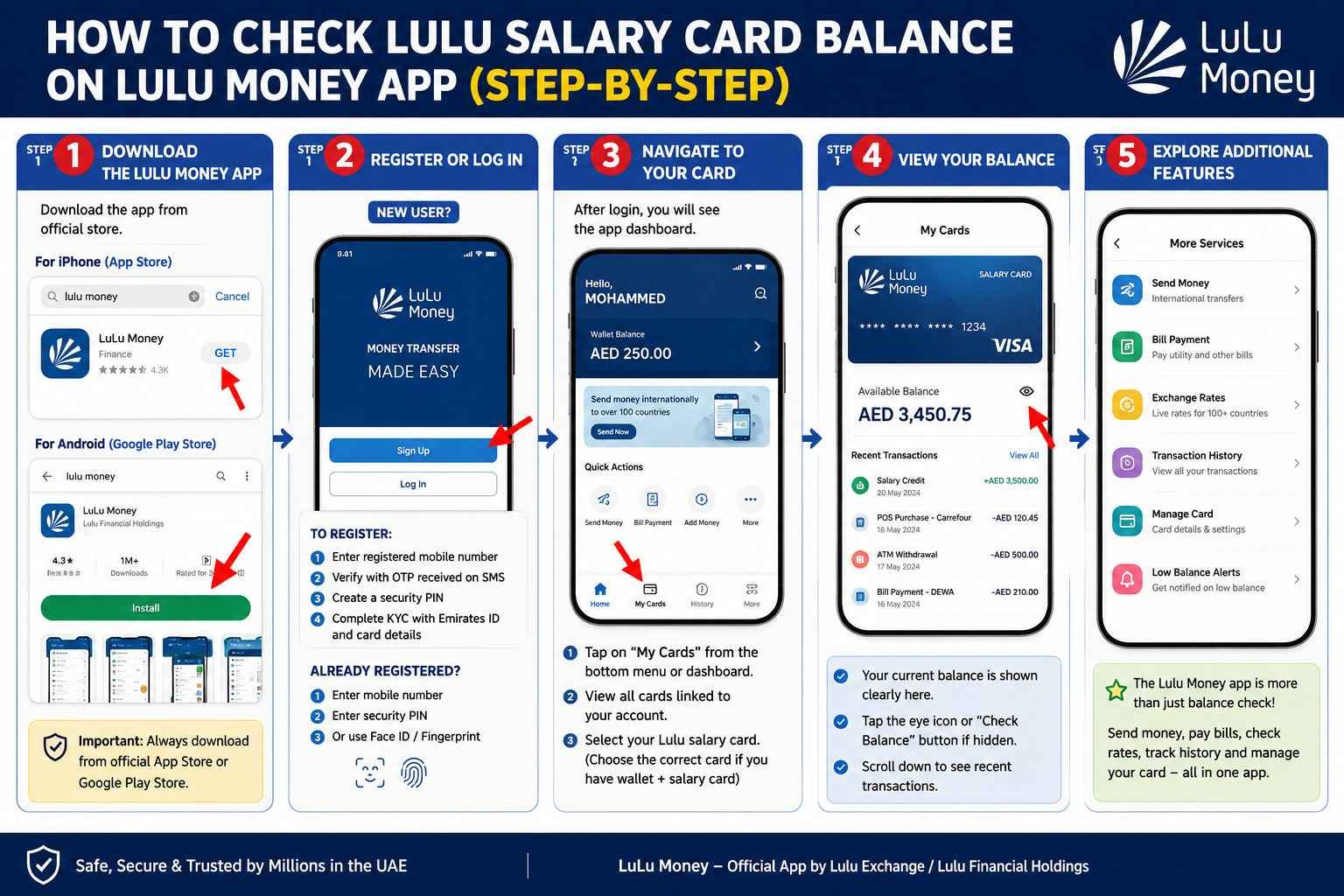
Lulu Money App Balance Check — Step by Step Guide UAE
Want to check your Lulu salary card balance without visiting a branch or sending an SMS? The Lulu Money app is the fastest and most convenient way to stay on top of your finances. You can check your balance anytime, anywhere — right from your phone. Here’s exactly how to do it.
Safety Note: UAEfinbiz is an informational guide only and does not have access to your Lulu card or account. Never share your card number, PIN, OTP, Emirates ID, or login credentials with any third-party website or individual. Always use official Lulu Exchange channels for balance checks and transactions. For your security, only download the Lulu Money app from the official Apple App Store or Google Play Store, and visit the official website at lulumoney.com for verified information. Lulu Exchange will never ask for your PIN or OTP outside of their official app or verified channels.
Why Use the Lulu Money App?
The Lulu Money app is the official digital platform for Lulu Exchange’s “My Pay My Card” salary card — one of the most widely used WPS cards in the UAE, serving over 400,000 employees . The app gives you more than just a balance check:
- Real-time balance — see your available funds instantly
- Transaction history — track every salary credit and purchase
- International remittances — send money home directly from your salary balance
- Bill payments — pay utilities like DEWA and Etisalat
- Live exchange rates — check AED-to-home-currency rates
- Low-balance alerts — get notified when funds are running low
- PIN reset — if you forget your card PIN, reset it directly through the app
Best of all, balance checks through the app are completely free and available 24/7 .
Step 1: Download the Lulu Money App
The Lulu Money app works on both iPhone and Android devices.
- iPhone users: Open the App Store, search for “Lulu Money”, and tap Get.
- Android users: Open Google Play Store, search for “Lulu Money”, and hit Install .
Important: Always download from the official store. The app has over 1 million downloads on Android and a 4.3-star rating, making it one of the most trusted financial apps in the UAE . The publisher should be listed as Lulu Exchange or Lulu Financial Holdings .
Step 2: Register or Log In
If you’re using the app for the first time, you’ll need to register.
To Register:
- Open the Lulu Money app.
- Tap “Sign Up” on the welcome screen.
- Enter your registered mobile number — this must be the same number linked to your Lulu salary card.
- You’ll receive an OTP (One-Time Password) via SMS — enter it to verify your number .
- Create a security PIN — you’ll use this for quick login.
- Complete the KYC (Know Your Customer) process by entering your Emirates ID and card details .
To Log In (if already registered):
- Open the app.
- Enter your registered mobile number.
- Enter your security PIN.
- If biometric login is enabled, you can also use FaceID or fingerprint .
- You’re in.
Step 3: Navigate to Your Card
Once logged in, you’ll see the app dashboard.
- Look for the “My Cards” section — usually found on the bottom navigation bar or the main dashboard .
- Tap on “My Cards” to see all cards linked to your account .
- Select your Lulu salary card — if you have multiple accounts (wallet and salary card), make sure you tap the correct one .
Step 4: View Your Balance
After selecting your salary card:
- Your current available balance will be displayed clearly on the screen .
- Below the balance, you’ll see recent transactions — including salary credits and purchases.
- Tap the eye icon or “Check Balance” button if the balance isn’t visible immediately .
That’s it — you’re done. You can check your balance anytime without visiting a branch or waiting for an SMS reply.
Step 5: Explore Additional Features
The Lulu Money app isn’t just for balance checks. You can also:
- Send money internationally — transfer funds to bank accounts in over 100 countries
- Pay bills — settle DEWA, Etisalat, Du, and other utility bills
- Check exchange rates — see live AED-to-currency rates for your home country
- Track transaction history — view all past credits and purchases
- Manage your card — view card details and set low-balance alerts
Charges
The Lulu Money app is completely free to download and use. There are no charges for balance checks through the app .
Standard data charges from your mobile network may apply.
Troubleshooting
Sometimes things don’t work as expected. Here are common issues and how to fix them.
App not showing my balance?
- Make sure you’re logged in with the correct registered mobile number
- Check your internet connection — a weak signal can stop the app from loading
- Try closing and reopening the app
- Ensure you’ve selected the correct card (salary card, not a wallet or gift card)
OTP not received during login?
- Check your mobile network signal
- Make sure the mobile number linked to your Lulu card is correct
- Wait 2–3 minutes and request the OTP again
- If still not received, try the SMS method (send BAL to 51199) as a backup
Login issues?
- Forgot your security PIN? Look for the “Forgot PIN” option and follow the verification steps
- Account locked? You may need to visit a Lulu Exchange branch with your Emirates ID
- Still stuck? Call Lulu Exchange at 600 526 526 for support
Card not showing in “My Cards”?
- Your salary card might not be linked to your mobile number yet
- Visit any Lulu Exchange branch with your Emirates ID to get it linked
- Alternatively, contact customer care at 600 526 526
Frequently Asked Questions
Do I need to register for the Lulu Money app to check my balance?
Yes. You need to register once with your registered mobile number and Emirates ID. After that, just log in whenever you want .
Is the Lulu Money app free to use?
Yes — the app is completely free to download and balance checks are free. International remittances and bill payments may have fees, but balance inquiries cost nothing .
Can I check my Lulu salary card balance online without the app?
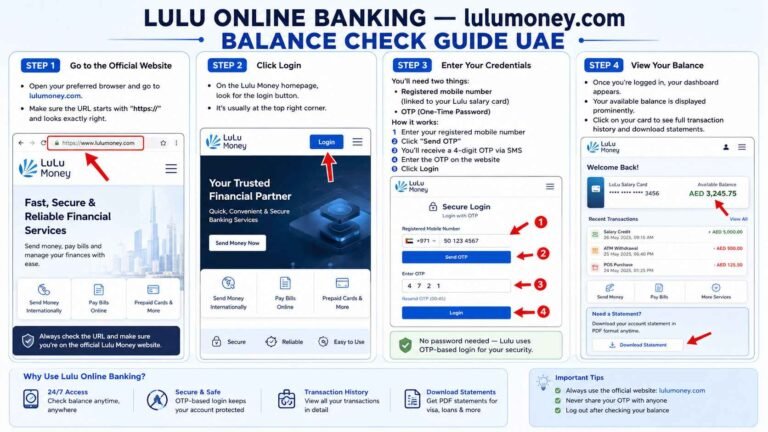
Yes — you can visit lulumoney.com in your browser and log in with your registered mobile number and OTP .
Can I check my balance outside the UAE?
Yes — the Lulu Money app works from anywhere with an internet connection . However, the SMS service (51199) works mainly within the UAE .
What if I forgot my phone banking PIN?
You can reset your PIN directly through the Lulu Money app by tapping “Forgot PIN” and following the OTP verification steps . If that doesn’t work, visit any Lulu Exchange branch with your Emirates ID.
Is the Lulu Money app secure?
Yes — Lulu Exchange is fully regulated by the Central Bank of the UAE and uses bank-grade encryption to protect your data . The app also supports biometric login for added security


One Comment