
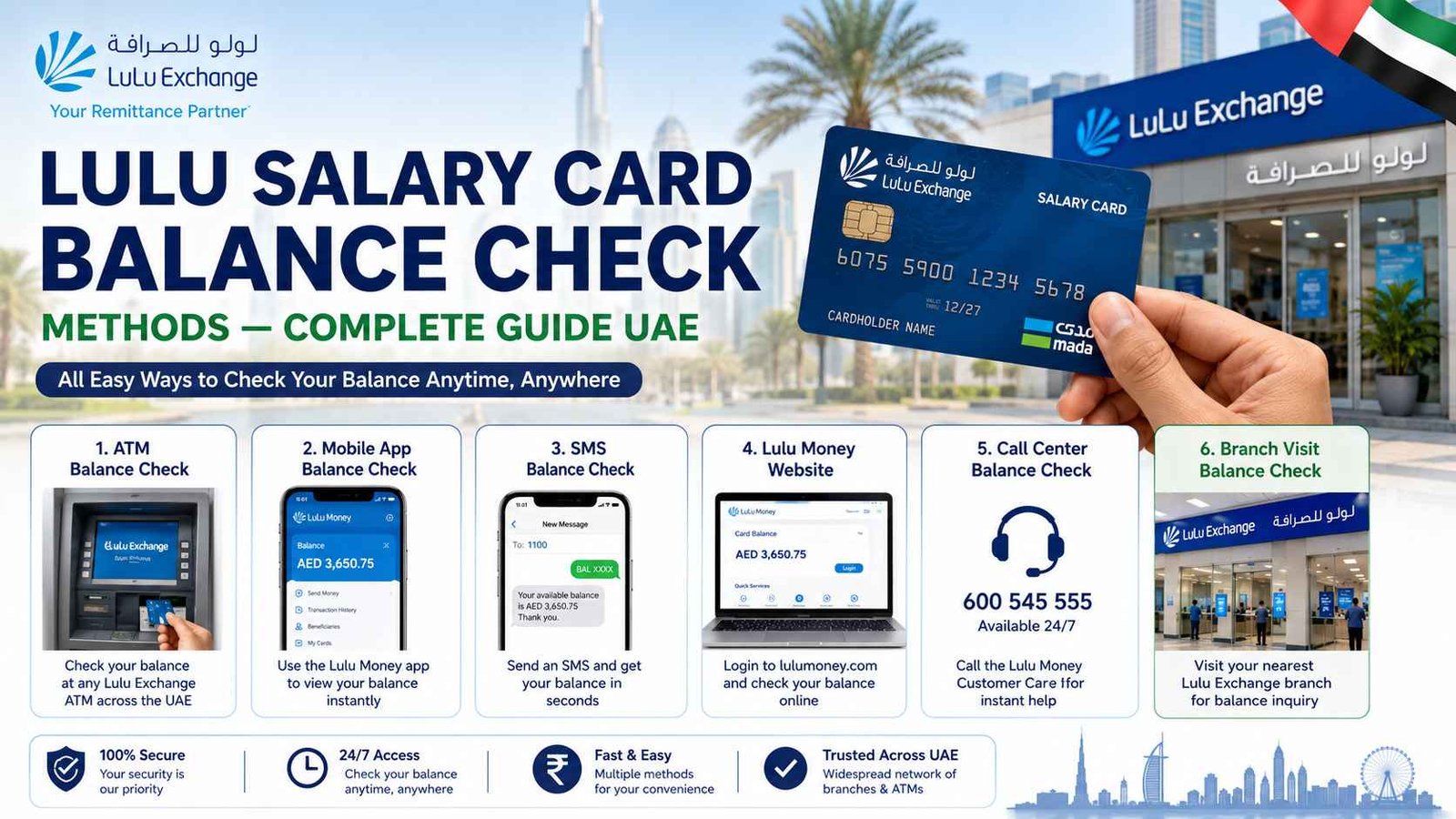
Lulu Salary Card Balance Check — Complete Guide UAE
Need to check your Lulu salary card balance? Unlike a regular bank account, Lulu “My Pay My Card” uses specific channels for balance checks. This guide covers every single method — the Lulu Money app, SMS, online banking, ATM, phone banking, and in-person branch visits. So you never have to search anywhere else.
Safety Note: UAEfinbiz is an informational guide only and does not have access to your Lulu card or account. Never share your card number, PIN, OTP, Card ID, Emirates ID, or login credentials with any third-party website or individual. Always use official Lulu Exchange channels for balance checks. The official Lulu Money website is lulumoney.com, and the official SMS shortcode is 51199. Lulu Exchange will never ask for your PIN or OTP outside of their official app, website, or verified phone number (600 526 526). If you receive any suspicious messages, ignore them and report immediately.
What is Lulu “My Pay My Card”?
Lulu “My Pay My Card” is a prepaid salary card issued by Lulu Exchange, one of the largest financial services providers in the UAE. It’s part of the UAE’s WPS (Wage Protection System) programme, designed for employees who receive their salaries on a prepaid payroll card rather than a traditional bank account.
Key features:
- Over 400,000 users in the UAE
- 30,000+ corporate clients
- Mastercard network — accepted worldwide
- International remittances to over 100 countries
- Live exchange rates for sending money home
Important: Lulu salary cards are NOT linked to regular banking apps like FAB Mobile or Emirates NBD. You must use Lulu-specific channels.
Find Your Method — Choose What Works for You
Different situations call for different methods. Here’s a quick overview:
| Method | Best For | Full Guide Link |
|---|---|---|
| Lulu Money App | Daily use, quick checks | Lulu Money App Balance Check Guide |
| SMS Balance Check | No internet, basic phones | Lulu SMS Balance Check Guide |
| Online Banking | Computer users, statements | Lulu Online Banking Guide |
| ATM Balance Inquiry | Printed receipt, 24/7 | Lulu ATM Balance Inquiry Guide |
| Phone Banking | Speak to someone | Lulu Phone Banking Guide |
| Branch Visit | In-person help, PIN reset | Lulu Exchange Branch Guide |
Lulu Money App — Step by Step
The Lulu Money app is the fastest and most convenient way to check your balance.
How to check:
- Download the Lulu Money app from the App Store (iPhone) or Google Play Store (Android)
- Register using your registered mobile number and Emirates ID, or log in if already registered
- Go to “My Cards” on the dashboard
- Select your salary card — your balance appears instantly
Cost: Free (standard data charges may apply)
Full guide: Lulu Money App Balance Check — Step by Step Guide UAE
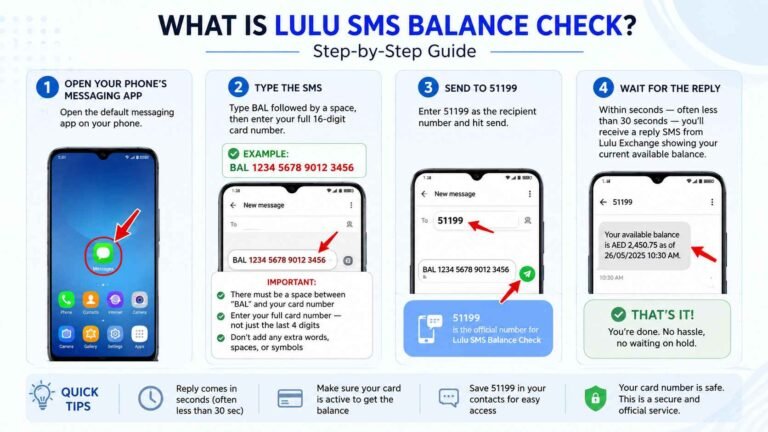
SMS Balance Check — BAL to 51199
No smartphone or internet? No worries. Just send a simple text.
How to check:
- Open your phone’s messaging app
- Type BAL followed by a space and your full 16-digit card number
- Example:
BAL 1234 5678 9012 3456
- Example:
- Send to 51199
- Within seconds, you’ll receive a reply with your available balance
Cost: Approximately AED 0.30 per SMS (standard SMS rates apply)
Full guide: Lulu SMS Balance Check — BAL to 51199 Guide UAE
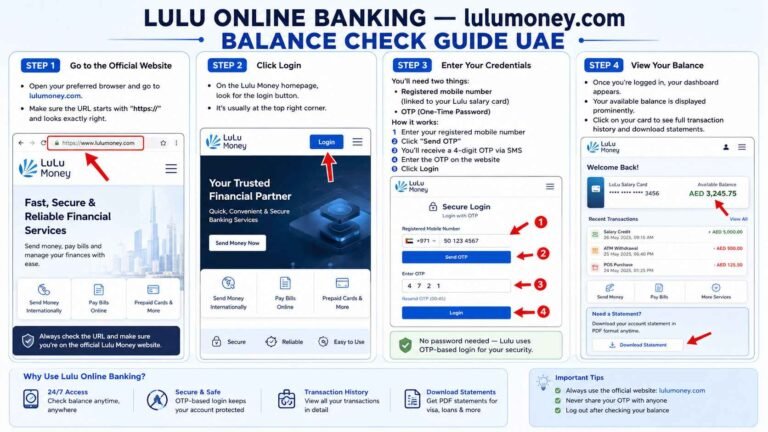
Online Banking — lulumoney.com
Prefer using a computer? Lulu online banking gives you full access.
How to check:
- Visit lulumoney.com
- Click Login
- Enter your registered mobile number
- Enter the OTP sent to your phone
- Your balance appears on the dashboard
Cost: Free
Full guide: Lulu Online Banking — lulumoney.com Balance Check Guide UAE
ATM Balance Inquiry
ATMs are everywhere in the UAE and available 24/7.
How to check:
- Find an ATM with the Mastercard logo (most UAE ATMs)
- Insert your Lulu card
- Enter your 4-digit PIN
- Select “Balance Inquiry”
- View your balance on screen (optional: print a receipt)
Supported ATMs: Lulu Exchange branches, Emirates NBD, Emirates Islamic, Mashreq, FAB, RAKBank, and most UAE ATMs.
Cost: Free at Lulu Exchange ATMs. Other ATMs may charge AED 1–2 per inquiry.
Full guide: Lulu ATM Balance Inquiry — Supported ATMs Guide UAE
Phone Banking — 600 526 526
Prefer to talk to someone? Lulu phone banking is available 24/7.
How to check:
- Call 600 526 526
- Select your language (1 for Arabic, 2 for English)
- Enter your 16-digit card number
- Enter your phone banking PIN
- Listen to your balance read out to you
- Option: Say “Agent” to speak to a real person
Agent Hours: Saturday to Thursday, 8 AM to 8 PM (UAE time)
Cost: Standard call rates apply (no additional bank fees)
Full guide: Lulu Phone Banking — 600 526 526 Balance Check Guide UAE
Branch Visit — In-Person Balance Check
Sometimes you just need face-to-face service.
How to check:
- Find a Lulu Exchange branch near you (over 200 branches across UAE)
- Bring your Lulu card and Emirates ID
- Take a token and wait for your number
- Ask the teller to check your balance
- Receive your balance (printed receipt optional)
Best for: PIN reset, mobile number update, salary not credited, printed statements, card replacement.
Cost: Free
Full guide: Lulu Exchange Branch Balance Check — In-Person Guide UAE
Quick Reference — All Lulu Methods
| Method | What You Do | Who Can Use |
|---|---|---|
| Lulu Money App | Download app, register, tap My Cards | All Lulu cardholders |
| SMS | Text BAL [card#] to 51199 | All Lulu cardholders |
| Online Banking | Visit lulumoney.com, login with OTP | All Lulu cardholders |
| ATM | Insert card, enter PIN, select balance inquiry | All Lulu cardholders |
| Phone Banking | Call 600 526 526, follow IVR | All Lulu cardholders |
| Branch Visit | Visit any Lulu Exchange branch with Emirates ID | All Lulu cardholders |
Frequently Asked Questions
How can I check my Lulu salary card balance online?
You have two options. Use the Lulu Money app by going to “My Cards” to see your balance instantly, or visit lulumoney.com and log in with your registered mobile number and OTP. For full details, see our Lulu Money App guide.
What is the Lulu balance enquiry number?
Call 600 526 526 to reach Lulu Exchange’s phone banking service. It’s available round the clock for automated balance enquiries. Learn more in our Phone Banking guide.
Is there a charge for Lulu SMS balance check?
Yes — around AED 0.30 per text message. Your mobile operator deducts this from your prepaid credit or adds it to your monthly bill. See our SMS Balance Check guide for full details.
Can I check my Lulu balance without internet?
Absolutely. You can use SMS (send BAL to 51199), visit any ATM, or call 600 526 526 through phone banking. All of these work without an internet connection.
My salary was credited but my Lulu balance hasn’t changed. Why?
It usually takes 24 to 48 hours for WPS salary payments to show up in your account. Give it a couple of business days. If it still hasn’t updated, get in touch with Lulu Exchange at 600 526 526 or visit a branch with your Emirates ID.
What ATMs can I use to check my Lulu balance?
You can use any ATM that displays the Mastercard logo. This includes Lulu Exchange branch ATMs, Emirates NBD, Emirates Islamic, Mashreq, FAB, and RAKBank. See our ATM Balance Inquiry guide for full details.
Do I need to register for the Lulu Money app?
Yes — you need to register once with your registered mobile number and Emirates ID. After that, just log in whenever you want. Read our Lulu Money App guide for step-by-step instructions.
What if I forget my Lulu card PIN?
You can reset your PIN through the Lulu Money app, or visit any Lulu Exchange branch with your Emirates ID and card. The teller will help you reset it.
Related Guides
- Lulu Money App Balance Check — Step by Step Guide UAE
- Lulu SMS Balance Check — BAL to 51199 Guide UAE
- Lulu Online Banking — lulumoney.com Balance Check Guide UAE
- Lulu ATM Balance Inquiry — Supported ATMs Guide UAE
- Lulu Phone Banking — 600 526 526 Balance Check Guide UAE
- Lulu Exchange Branch Balance Check — In-Person Guide UAE
2 Comments