C3Pay Salary Check Online UAE – Check C3Pay Balance & Salary 2026
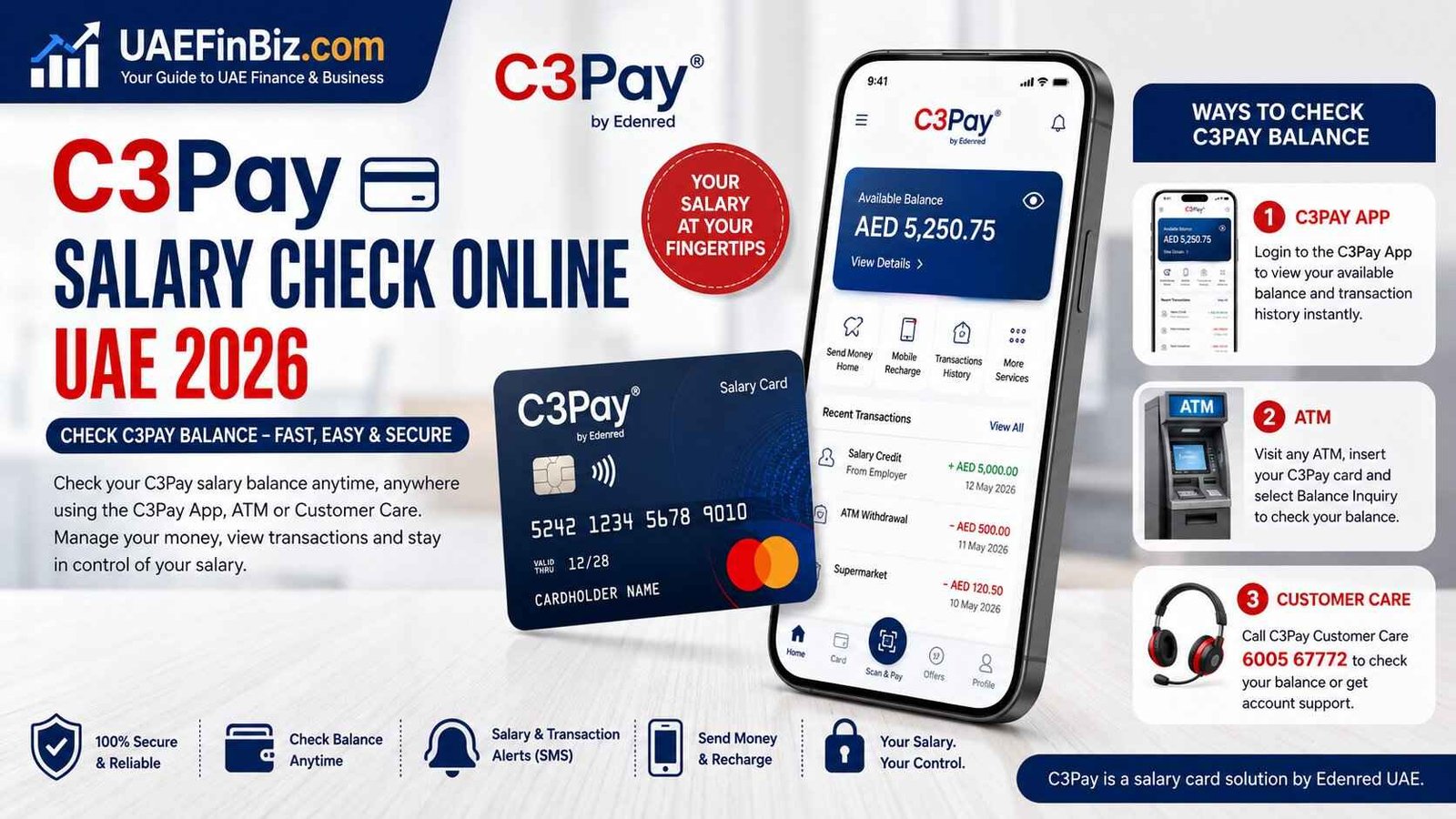
If your salary is paid to a C3Pay salary card in the UAE, you do not have to wait for an ATM visit or ask your employer every time you want to know whether your salary has arrived. The C3Pay system gives cardholders several ways to check their available money, including the C3Pay mobile app, an ATM and customer support by phone.
For most employees, the C3Pay app is the easiest option because it shows the available balance and transaction history in one place. You can also use it to manage other services connected to your C3Pay card.
Safety note: Never share your C3Pay PIN, OTP, card details or Emirates ID information with anyone claiming to be customer support through an unofficial channel. For balance enquiries and account support, use Edenred’s official C3Pay channels. Edenred UAE C3Pay official page
Read More: Lulu Salary Card Balance Check
How to Check C3Pay Salary Balance Online
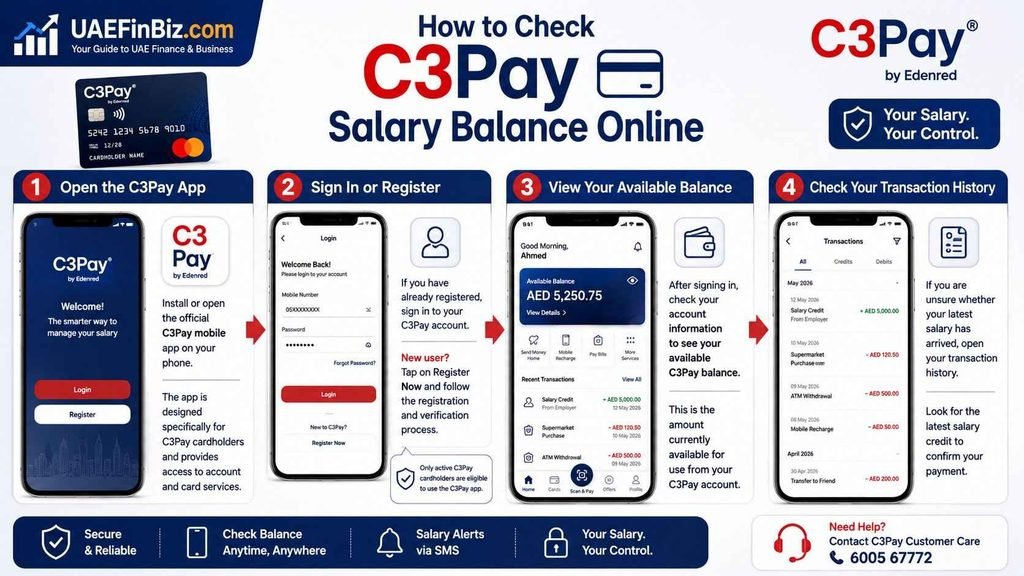
The simplest way to check your C3Pay salary balance online is through the C3Pay mobile app.
Edenred states that an employee with an active C3Pay card can download and register for the app. The app allows employees to check their available balance and view their transaction history.
Step 1: Open the C3Pay App
Install or open the official C3Pay mobile app on your phone.
The app is designed specifically for C3Pay cardholders and provides access to account and card services.
Step 2: Sign In or Register
If you have already registered, sign in to your C3Pay account.
If you are using the app for the first time, follow the registration and verification process shown in the application.
Only active C3Pay cardholders are eligible to use the C3Pay app.
Step 3: View Your Available Balance
After signing in, check your account information to see your available C3Pay balance.
This is the amount currently available for use from your C3Pay account.
The app also lets you review previous transactions, which can be particularly useful if your salary has recently been credited and you want to confirm the payment.
Step 4: Check Your Transaction History
If you are unsure whether your latest salary has arrived, do not look only at the balance.
Open your transaction history and look for the latest salary credit.
This can help distinguish between a salary that has not yet been credited and a balance that has changed because of a purchase, withdrawal or another transaction.
How to Check C3Pay Balance Without the App
You can still check your C3Pay salary balance if you do not want to use the mobile application.
Edenred confirms that C3Pay cardholders can check their balance through an ATM or by calling 6005 67772.
C3Pay Balance Check at ATM
Take your C3Pay card to an ATM that supports the card.
Insert the card and enter your ATM PIN.
Look for the balance enquiry or account balance option on the ATM screen. The exact wording can differ depending on the ATM.
The C3Pay FAQ currently states that employees can check their balance at any ATM.
If you are using an ATM mainly to check your balance rather than withdraw cash, check the screen carefully for any applicable fee before confirming the transaction.
C3Pay Salary Check by Phone
Another option is to contact C3Pay customer support.
C3Pay customer care: 6005 67772
Edenred lists this number for C3Pay cardholders and also states that employees can use it for balance enquiries.
You may be asked security questions or verification information before account-related information is provided. This is an important security measure, so do not give your card information to anyone contacting you through an unofficial number.
What Is C3Pay Salary Card?
C3Pay is a payroll card solution provided by Edenred UAE. Employers use Edenred’s payroll services to pay employees through C3Pay salary cards.
The card works as a practical alternative for employees who receive their wages through a payroll card rather than a traditional personal bank account.
C3Pay cardholders can use the card for purchases and ATM withdrawals, while the C3Pay app provides additional money-management services. Edenred says the card can be used at ATMs, online and in stores where Mastercard is accepted.
C3Pay is therefore more than a simple salary card. The app gives employees access to their balance, transaction history, money transfers and mobile-recharge services.
How to Know If Your C3Pay Salary Has Arrived
If you are waiting for your monthly salary, there are several practical ways to confirm it.
First, open the C3Pay app and check your available balance.
Then review the transaction history for the latest salary credit.
C3Pay also offers optional salary SMS alerts through the app. Edenred says users can activate SMS alerts for salary notifications or transaction activity.
This is useful for employees who want to know when their salary has been credited without repeatedly opening the application.
C3Pay Salary Not Showing in Balance
If your salary has not appeared in your C3Pay balance, do not immediately assume that the money has disappeared.
The employer’s payroll processing may still be underway.
Edenred’s current FAQ says its WPS salary-processing cut-off timings are 10 am, 12 pm and 1 pm, while non-WPS salaries can be processed until 4 pm.
If the employer says the salary has already been processed but the amount is still missing from your C3Pay account, check the transaction history first.
If there is still no credit, contact your employer’s payroll or HR department and then C3Pay support if necessary.
C3Pay Balance Is Different From Salary Processing Status
This distinction is important.
Your employer may have submitted or processed the salary while the amount is still going through the payroll process.
C3Pay’s payroll system provides salary-transfer tracking for employers, while employees can use their C3Pay account and app to see their available balance.
So if your employer says the salary file has been submitted, that does not necessarily mean the money will appear in your available balance at exactly the same moment.
C3Pay Balance Check Using SMS
C3Pay also provides SMS alert services, but this should not be confused with a separate SMS command for manually requesting your balance.
According to Edenred’s current FAQ, SMS services can be activated through the C3Pay app or by calling 6005 67772. The available alert types include salary alerts and transaction alerts.
For an actual on-demand balance check, the clearest options are the C3Pay app, an ATM or customer support.
Can I Check C3Pay Balance Online Without the App?
For employees, the C3Pay app is the main online method for viewing the available balance.
Edenred’s official information specifically says employees can check their available balance through the C3Pay mobile app.
There is also an online C3Pay customer portal, but employees should not assume that a random website offering a “C3Pay balance check” is legitimate.
Always start from Edenred’s official C3Pay service rather than entering card or personal information into an unfamiliar website.
C3Pay Balance Check for Salary Card Holders
The process is essentially the same whether you are checking your balance after receiving your monthly salary or simply checking how much money remains on the card.
Open the C3Pay app and view your available balance.
If you need more detail, open the transaction history to see recent credits and spending.
If you do not have access to the app, use an ATM or contact C3Pay customer support on 6005 67772.
Does C3Pay Have a Minimum Balance?
Edenred currently states that C3Pay has no minimum balance requirement and no minimum salary requirement.
This means an employee does not need to maintain a particular amount simply to keep the C3Pay card active based on the minimum-balance rule described by Edenred.
C3Pay ATM Withdrawal and Balance Check
C3Pay can also be used at ATMs for cash withdrawals.
Edenred currently states that employees can withdraw up to AED 5,000 per day. Its FAQ also lists two free withdrawals per month at C3Pay ATMs and one free withdrawal at RAKBANK ATMs, while withdrawals at other ATMs may carry a fee.
Because ATM charges and service conditions can change, check the current C3Pay terms before relying on a particular ATM fee.
C3Pay App Features Beyond Balance Checking
The balance-check feature is only one part of the C3Pay app.
Depending on the services available to your account, the app can be used to view transaction history, send money home and recharge mobile numbers. Edenred also describes C3Pay as a Mastercard that can be used for purchases and ATM withdrawals.
The app can therefore be useful for managing your salary after it has been credited rather than simply checking the amount.
C3Pay Card Not Working? Check These Things First
If your C3Pay card is declined, start by checking the available balance in the app.
If there is enough money, review recent transactions to see whether the card has already been charged or whether an unfamiliar transaction appears.
You can also use the card controls in the C3Pay app. Edenred says users can block or unblock the C3Pay card and receive security alerts for card activity.
If the problem continues, contact C3Pay support rather than repeatedly attempting transactions.
C3Pay Customer Care Number UAE
For C3Pay cardholders in the UAE, Edenred currently lists:
C3Pay customer care: 6005 67772
Edenred’s contact page also lists +971 4 521 4000 for other enquiries and identifies its UAE office in Business Bay, Dubai.
For account-specific problems, use the C3Pay cardholder number rather than relying on unofficial numbers found on social media or random websites.
C3Pay Salary Card and WPS
C3Pay is closely connected with UAE payroll processing.
Edenred provides payroll services through which companies can pay WPS and non-WPS salaries to C3Pay cards or bank accounts. Its current payroll information also describes salary-transfer tracking and WPS payroll processing.
This is why C3Pay searches often overlap with terms such as WPS salary check UAE, salary card balance check, WPS salary payment and salary not received.
However, C3Pay balance checking and WPS status checking are not exactly the same thing.
The balance tells you how much money is available to you. WPS relates to the payroll payment process through the UAE’s regulated wage-payment system.
C3Pay Balance Check – Quick Answer
How can I check my C3Pay salary balance online?
Use the C3Pay mobile app. Edenred confirms that active C3Pay cardholders can check their available balance and transaction history through the app.
Can I check my C3Pay balance without the app?
Yes. Edenred says you can check your balance at an ATM or by calling 6005 67772.
What is the C3Pay customer care number?
The C3Pay cardholder number listed by Edenred is 6005 67772.
How do I know whether my salary has arrived?
Check your available balance and transaction history in the C3Pay app. You can also activate salary SMS alerts.
Is there a minimum C3Pay balance?
Edenred currently says there is no minimum balance requirement.
Can I withdraw my C3Pay salary from an ATM?
Yes. C3Pay cards can be used for ATM withdrawals, subject to the applicable limits and fees.
Can I use C3Pay for online purchases?
Yes. Edenred says the C3Pay Mastercard can be used online and at stores where Mastercard is accepted.
Final Thoughts
For most C3Pay users in the UAE, the C3Pay app is the quickest way to check a salary balance online because it provides the available balance and transaction history without requiring an ATM visit.
If the app is unavailable, you still have the ATM and telephone options. And if a monthly salary is missing, checking the transaction history first can save time before contacting HR or C3Pay support.
As C3Pay is part of the wider UAE payroll and WPS ecosystem, understanding the difference between salary processing, salary credit and available balance is just as important as knowing where to check the money. UAEFinBiz.com will continue covering these UAE salary-card and balance-check methods so employees can find the right method for their particular card.