
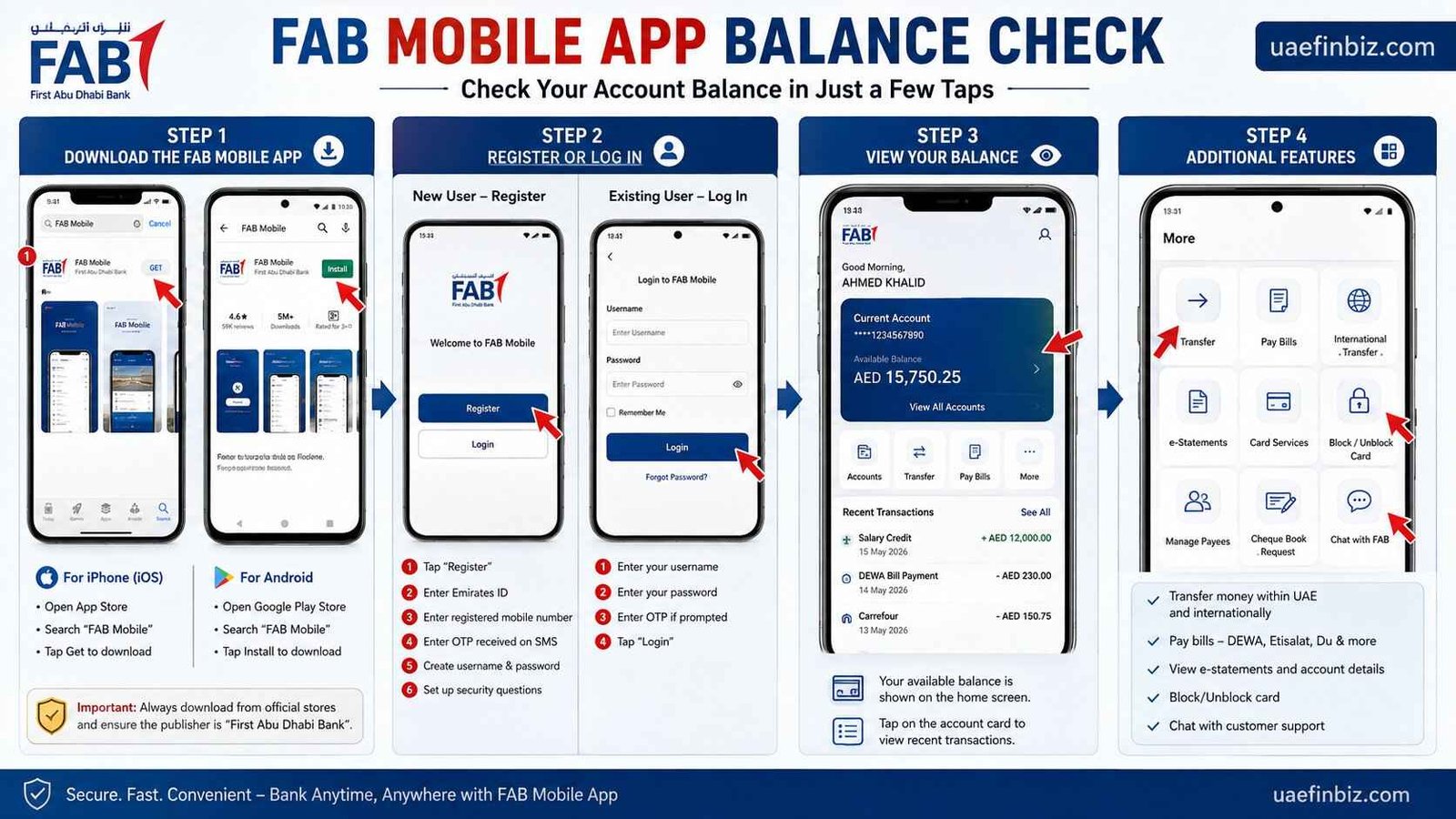
FAB Mobile App Balance Check — Step by Step Guide UAE
Want to check your FAB balance without visiting an ATM or calling the bank? The FAB Mobile app is the quickest and most convenient way. You can check your balance anytime, anywhere — right from your phone. Here’s exactly how to do it.
Safety Note: UAEfinbiz is an informational guide only and does not have access to your FAB account. Never share your card number, PIN, OTP, Emirates ID, or login credentials with any third-party website or individual. Always use official FAB channels for balance checks and banking transactions. For your security, only download the FAB Mobile app from the official Apple App Store or Google Play Store , and visit the official FAB website at www.bankfab.com for verified information and services . FAB will never ask for your PIN or OTP outside of their official app or verified channels
Step 1: Download the FAB Mobile App
The FAB Mobile app works on both iPhone and Android.
If you’re an iPhone user, head to the App Store, search for “FAB Mobile”, and tap Get. For Android users, open Google Play Store, search the same, and hit Install. You can also visit the official FAB website at bankfab.com for direct download links.
One important thing — always download from the official store. Fake banking apps do exist. Before you install, double-check that the publisher is listed as “First Abu Dhabi Bank”. That small step can save you from a lot of trouble.
Step 2: Register or Log In
If you’re using the app for the first time, you’ll need to register.
Here’s how to register:
Open the FAB Mobile app and tap “Register” on the welcome screen. You’ll be asked to enter your Emirates ID number and the mobile number you’ve registered with FAB. An OTP (One-Time Password) will be sent to that number via SMS. Enter the OTP, then create a username and password. Finally, set up your security questions — they’ll help you recover your password if you ever forget it.
If you already have an account, logging in is simpler. Just open the app, enter your username and password, and if prompted, enter the OTP sent to your registered mobile number. That’s it — you’re in.
Step 3: View Your Balance
Once you’re logged in, your available balance is displayed right on the home screen. You’ll also see your account name and account number clearly shown.
Want to check your recent transactions? Just tap on the account card and your transaction history will appear below. It’s that simple.
Step 4: Additional Features
The FAB Mobile app isn’t just for balance checks. You can also transfer money — both within the UAE and internationally. Pay your bills like DEWA, Etisalat, and Du directly from the app. View your e-statements, block or unblock your card if it’s lost or found, and even chat with customer support if you need help. It’s a complete banking tool in your pocket.
Charges
The FAB Mobile app is completely free to download and use. There are no charges for checking your balance through the app. Just keep in mind that your mobile network may apply standard data charges.
Troubleshooting
Sometimes things don’t work as expected. Here are a few common issues and how to fix them.
If the app isn’t showing your balance, first make sure you’re logged in with the correct account. Check your internet connection — a weak signal can stop the app from loading. Try closing the app and reopening it. If the problem continues, give FAB a call at 600 525 500.
Having login trouble? If you’ve forgotten your password, tap “Forgot Password” on the login screen and follow the instructions. If your account gets locked, you’ll need to call FAB phone banking at 600 525 500 to unlock it.
OTP not arriving? Check your mobile network signal. Make sure the mobile number linked to your FAB account is correct. Sometimes it takes a couple of minutes — wait 2 to 3 minutes and request the OTP again.
Frequently Asked Questions
Do I need to register for the FAB Mobile app to check my balance?
Yes. You need to register once with your Emirates ID and mobile number. After that, just log in whenever you want.
Can I check my FAB salary card balance on the FAB Mobile app?
No — FAB salary cards like Ratibi are not linked to the FAB Mobile app. To check those, use the Magnati portal at ppc.magnati.com or send BAL to 6667 via SMS.
Is the FAB Mobile app available in other languages?
Yes. The app supports both English and Arabic.
Can I check my NBAD account balance using the FAB Mobile app?
Absolutely. NBAD accounts were migrated to FAB back in 2017. You can use the FAB Mobile app for any NBAD-linked accounts.

One Comment