Lulu Online Banking — lulumoney.com Balance Check Guide UAE
Prefer checking your balance on a computer rather than your phone? Lulu Exchange’s online banking portal at lulumoney.com gives you full access to your salary card from any browser. Here’s how to check your balance, view transactions, and manage your money — all from your desktop or laptop.
Safety Note: UAEfinbiz is an informational guide only and does not have access to your Lulu card or account. Never share your username, password, PIN, OTP, or Emirates ID with any third-party website or individual. Always use the official Lulu Money portal at lulumoney.com for all your banking transactions. Bookmark the official URL and avoid clicking on suspicious links from emails or messages claiming to be from Lulu Exchange. Lulu Exchange will never ask for your login credentials outside of their official website.
What is Lulu Online Banking?
Lulu Online Banking is the web-based version of your Lulu salary card account. Unlike the mobile app which lives on your phone, online banking works on any device with a browser — computer, laptop, or even tablet.
It gives you access to everything you need:
- Check your card balance
- View transaction history
- Download statements
- Send money internationally
- Check exchange rates
- Manage your card settings
Think of it as your Lulu Exchange branch, open 24/7, right from your desk.
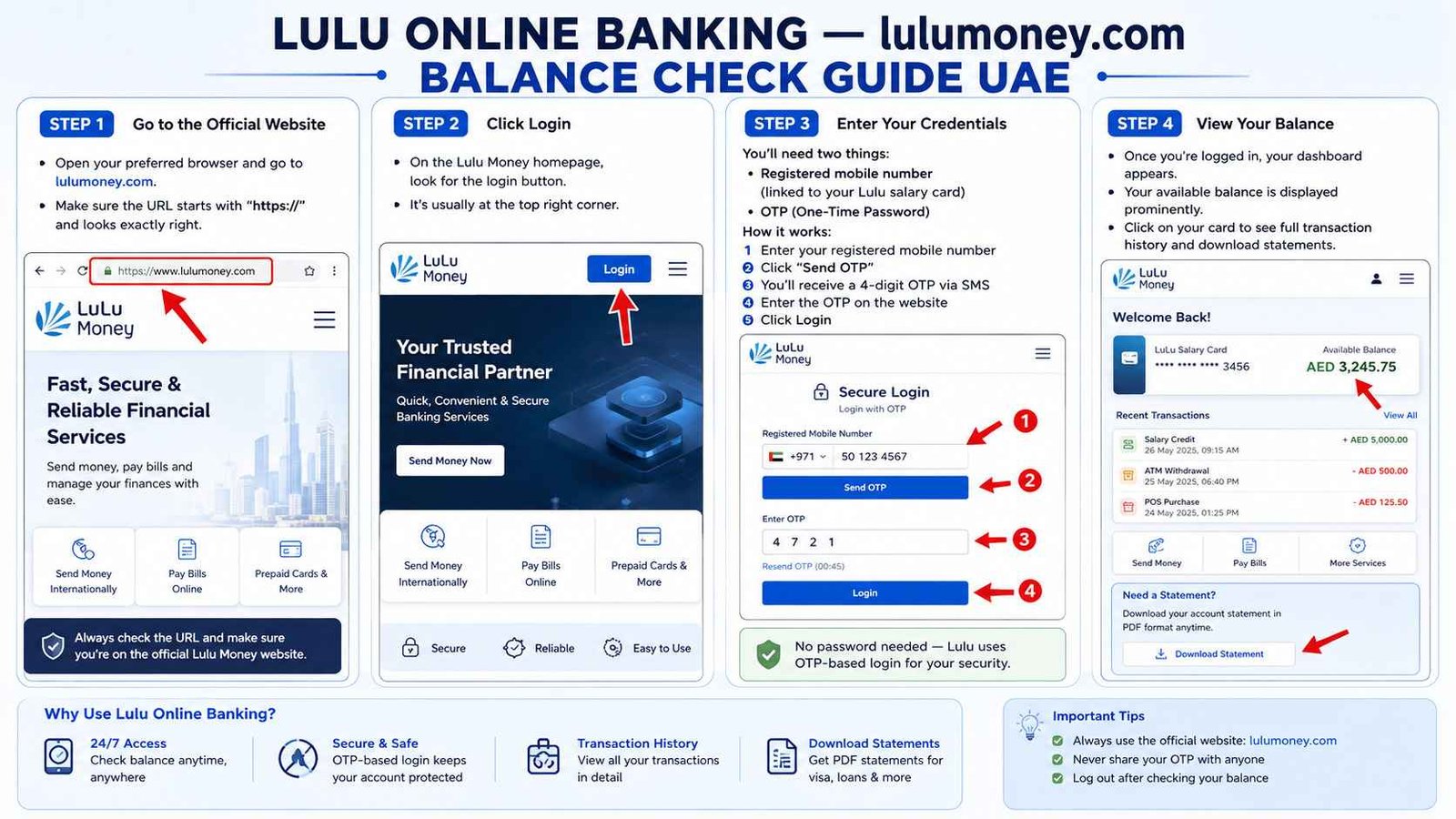
Step 1: Go to the Official Website
Open your preferred browser and go to lulumoney.com. Make sure you’re on the official website — check that the URL starts with “https://” and looks exactly right. Scammers sometimes create fake banking sites that look almost identical.
If you’re unsure, type the address yourself instead of clicking links from emails.
Step 2: Click Login
On the Lulu Money homepage, look for the login button. It’s usually at the top right corner. Click it to go to the secure login page where you’ll enter your details.
Step 3: Enter Your Credentials
You’ll need two things:
- Registered mobile number — the one linked to your Lulu salary card
- OTP (One-Time Password) — sent to your registered mobile number
How it works:
- Enter your registered mobile number
- Click “Send OTP”
- You’ll receive a 4-digit OTP via SMS
- Enter the OTP on the website
- Click Login
No password needed — Lulu uses OTP-based login for security. This means even if someone gets your mobile number, they can’t access your account without your phone.
Step 4: View Your Balance
Once you’re logged in, your dashboard appears. This is your financial command center.
Your available balance is displayed prominently — usually at the top or in a summary card. You’ll see:
- Your card number (masked for security)
- Available balance
- Last few transactions
To see more detail, click on your card. The full transaction history will open — you can scroll back months or even years. Need a statement for visa purposes? Download it right there in PDF format.
What Else Can You Do?
Online banking offers more than just balance checks:
Send money internationally — transfer funds to bank accounts in over 100 countries directly from your salary balance.
Check exchange rates — see live AED-to-currency rates for your home country.
View transaction history — track every salary credit, purchase, and transfer.
Download statements — get official transaction records in PDF for visa applications or personal records.
Manage your card — view card details and set preferences.
Registration — How to Get Started
If you haven’t used Lulu online banking before, here’s how to get started:
- Visit lulumoney.com and click Login
- Enter your registered mobile number
- Click “Send OTP”
- Enter the OTP you receive via SMS
- You’ll be prompted to create a security PIN for future logins
- Confirm your PIN and you’re in
Once registration is complete, you can log in anytime with your mobile number and OTP.
Troubleshooting
Sometimes things don’t work the way they should. Here’s what to do:
OTP not received?
- Check your mobile network signal
- Make sure the mobile number registered with Lulu Exchange is correct
- Wait 2–3 minutes and request OTP again
- If still not received, try the SMS method (send BAL to 51199) as a backup
Login issues?
- Make sure you’re entering the correct registered mobile number
- Check that you’ve entered the OTP correctly — it’s only valid for a few minutes
- If OTP expires, click “Resend OTP” for a new one
Can’t access the website?
- Make sure you’re on the correct URL — lulumoney.com
- Clear your browser cache and cookies
- Try a different browser
Account locked?
- Too many failed login attempts may lock your account temporarily
- Wait 15–30 minutes and try again
- If still locked, call Lulu Exchange at 600 526 526 or visit a branch
Online Banking vs Mobile App — Which One?
| Situation | Best Choice |
|---|---|
| Need full desktop experience | Online Banking |
| Checking on the go | Mobile App |
| Downloading statements | Online Banking (easier) |
| Quick balance check | Mobile App or SMS |
| Send money internationally | Both work |
Frequently Asked Questions
Do I need to register for online banking separately from the app?
No — your registered mobile number works for both. Once you’ve registered, you can use the same credentials for the app and the website.
Is online banking free?
Yes — Lulu online banking is completely free to use. No charges for balance checks.
Can I check my Lulu salary card balance online without the app?
Yes — visit lulumoney.com and log in with your registered mobile number and OTP. No app required.
Can I check my balance outside the UAE?
Yes — the Lulu online portal works from anywhere with an internet connection.
Is online banking safe?
Yes — Lulu Exchange is regulated by the Central Bank of the UAE and uses bank-grade encryption to protect your data. The OTP login system adds an extra layer of security.
What if I don’t have a computer?
You can use the Lulu Money app instead. Both give you the same access — just on different devices.
Quick Comparison — All Lulu Methods
| Method | What You Need | Best For |
|---|---|---|
| Lulu Money App | Smartphone + internet | Daily use, quick checks |
| SMS BAL to 51199 | Any phone | No internet, quick check |
| Online Banking | Computer + internet | Detailed view, statements |
| ATM | Card + PIN | Printed receipt |
| Phone Banking | Any phone | Speak to someone |
| Branch Visit | Emirates ID + Card | In-person help |