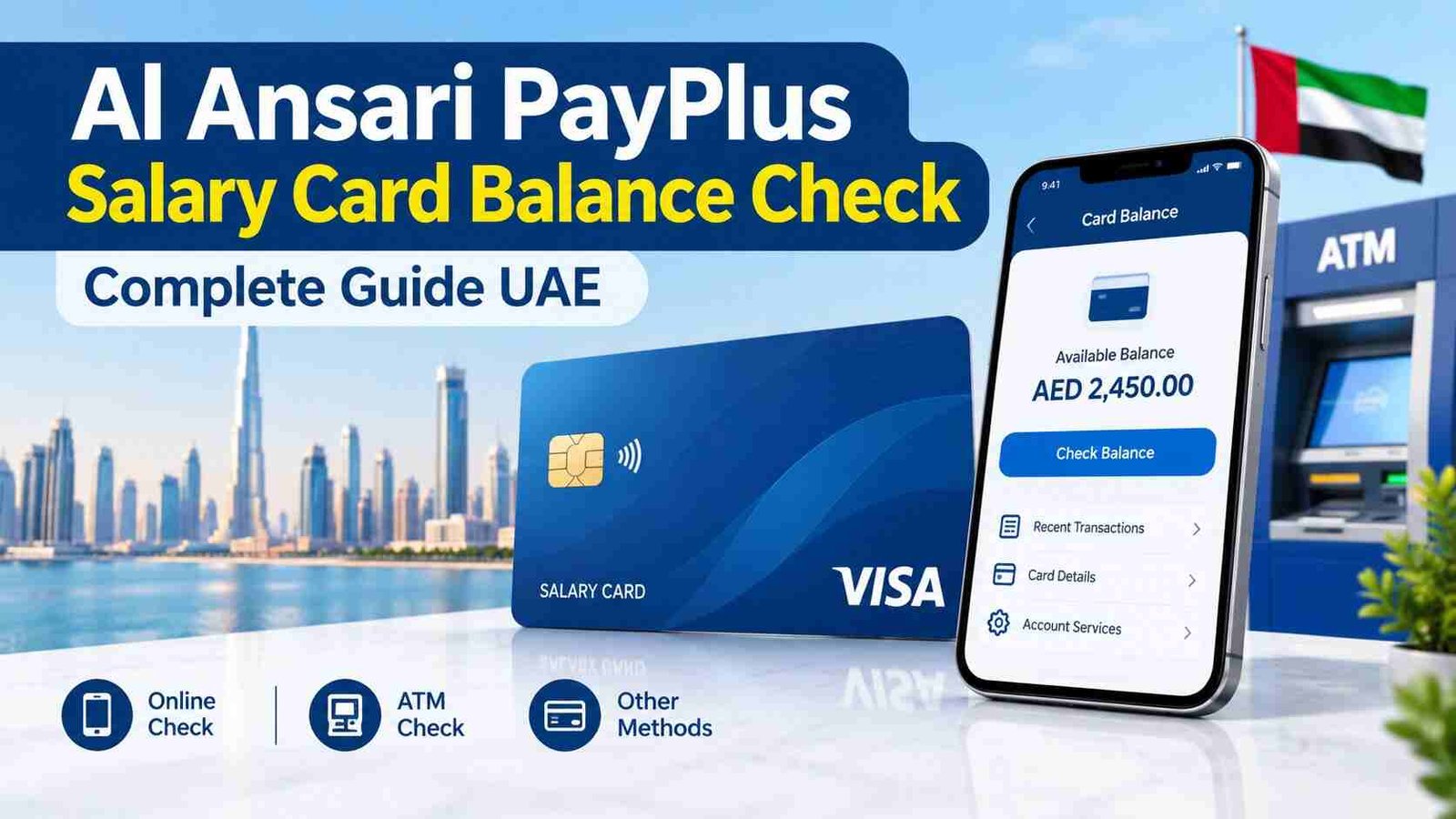
Al Ansari PayPlus Salary Card Balance Check—Complete Guide UAE
You just got your salary. Or you’re about to. And you need to know exactly what’s on that card before you start spending. No one wants that awkward moment at the checkout when the payment declines. Been there, done that, got the embarrassment. Let’s make sure that doesn’t happen to you.
Here’s the reality — the Al Ansari PayPlus card is one of the most widely used salary cards in the UAE, issued in partnership with FAB and running on the Visa network . That’s the good news. The bad news? If you don’t know the right way to check your balance, you might end up paying unnecessary fees. And nobody likes that.
This guide covers every single way to check your PayPlus card balance — no fluff, just solutions. Pick what works for you and get back to your day.
Safety Note: UAEfinbiz is an informational guide only and does not have access to your Al Ansari card or account. Never share your card number, PIN, OTP, Emirates ID, or login credentials with any third-party website or individual. Always use official Al Ansari Exchange channels for balance checks. For verified information, visit the official Al Ansari Exchange website at alansariexchange.com . Al Ansari will never ask for your PIN or OTP outside of their official app or verified channels. If you receive any suspicious messages, ignore them and report immediately.
What’s the Difference? PayPlus vs. PayRoll Card
Before we dive in, let’s clear something up. Al Ansari issues two types of cards :
- PayPlus Card: Visa network, works globally, can be used for online shopping and international ATM withdrawals.
- PayRoll Card: Closed-loop, works primarily within the UAE.
If you’ve got a PayPlus card (it’ll have the Visa logo), you’re in luck — it’s more flexible. This guide covers both, but if you have PayPlus, you get extra benefits like international usage and online transactions.
5 Ways to Check Your Al Ansari Salary Card Balance
Method 1: Al Ansari Exchange App (Recommended)
The app is the easiest and fastest way to check your balance. It’s free, available 24/7, and you can do it from anywhere . Over a million users have downloaded it, and it’s rated 4.5+ stars on Google Play .
How to check:
- Download the Al Ansari Exchange app from the App Store (iOS) or Google Play Store (Android) .
- Tap “Register” or “New User” and select UAE PASS to sign up instantly .
- Enter your Card ID (printed on the front of your card) .
- Enter the mobile number registered with your employer .
- Verify the OTP sent to your phone.
- Once logged in, your balance appears on the main dashboard under “My Cards” .
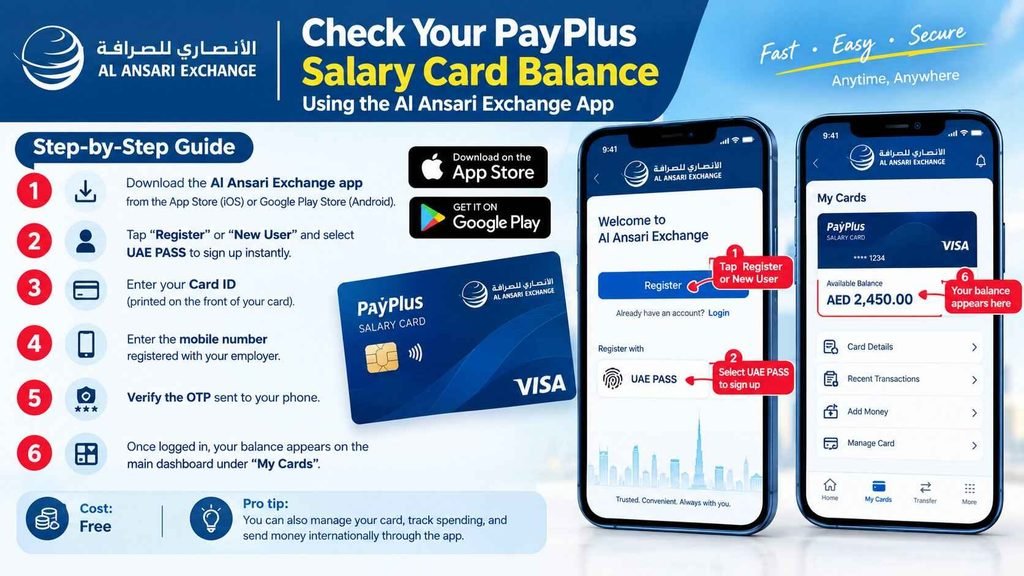
Pro tip: You can also manage your card, track spending, and send money internationally through the app .
Method 2: SMS Balance Check
No internet? No problem. SMS is your backup plan.
How to check:
- Open your phone’s messaging app.
- Type BAL followed by a space and your full card number.
- Example:
BAL 1234 5678 9123 4567
- Example:
- Send to 600 54 6000 .
- You’ll receive a reply with your balance within seconds.
Cost: Standard SMS rates from your mobile provider .
Important: Send from the mobile number registered with your card .
Method 3: Website Portal
If you’re on a computer and prefer not to download an app, use the official Al Ansari website.
How to check:
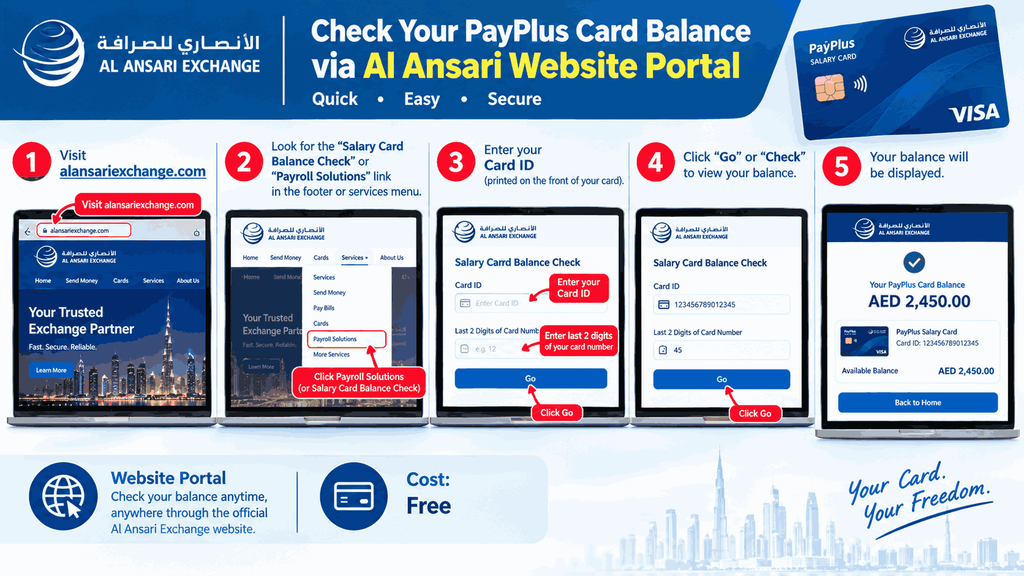
- Visit alansariexchange.com .
- Look for the “Salary Card Balance Check” or “Payroll Solutions” link in the footer or services menu .
- Enter your Card ID (printed on the front of your card) .
- Enter the last 2 digits of your card number .
- Click “Go” or “Check” to view your balance.
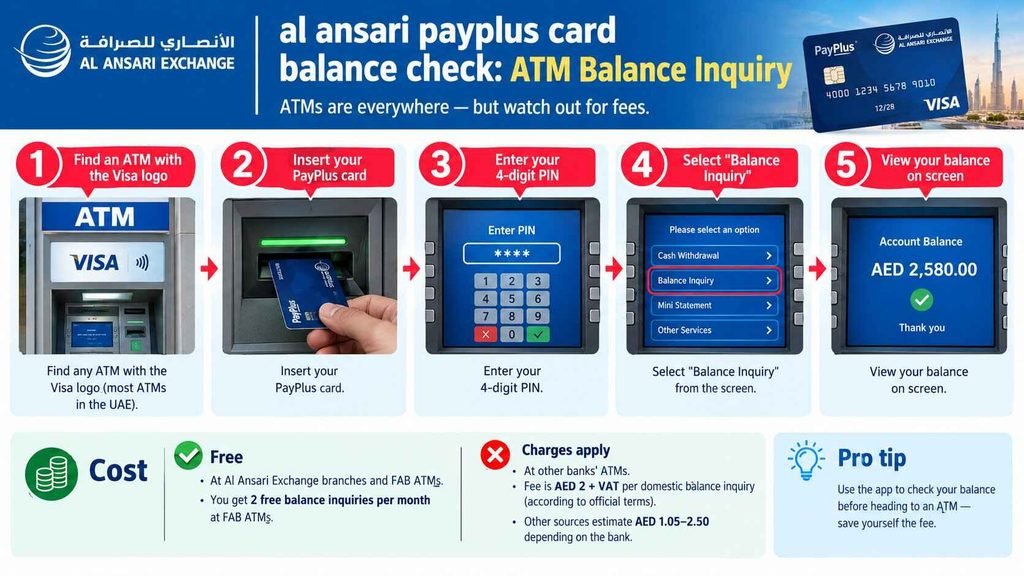
Method 4: ATM Balance Inquiry
ATMs are everywhere — but watch out for fees.
How to check:
- Find any ATM with the Visa logo (most ATMs in the UAE) .
- Insert your PayPlus card.
- Enter your 4-digit PIN.
- Select “Balance Inquiry” from the screen.
- View your balance on screen.
Cost:
- Free at Al Ansari Exchange branches and FAB ATMs . You get 2 free balance inquiries per month at FAB ATMs .
- Charges apply at other banks’ ATMs. According to official terms, the fee is AED 2 + VAT per domestic balance inquiry . Other sources estimate AED 1.05–2.50 depending on the bank .
Pro tip: Use the app to check your balance before heading to an ATM — save yourself the fee .
Method 5: Phone Banking — 600 54 6000
Prefer to talk to someone? The call centre is available 24/7 .
How to check:
- Call 600 54 6000 .
- Select your preferred language (English, Arabic, Hindi, etc.) .
- Choose the option for “Payroll” or “Card Services.”
- Follow the voice prompts to enter your card number.
- The automated system will read out your balance .
Cost: Free balance inquiries via the call centre . Standard call rates apply.
Method 6: Branch Visit — In-Person Check
Old-school, but sometimes you need it.
How to check:
- Find your nearest Al Ansari Exchange branch — over 200 across the UAE .
- Bring your PayPlus card and Emirates ID .
- Ask the teller to check your balance.
- Receive your balance verbally or get a printed statement.
Best for: PIN resets, card replacements, or when you need a printed statement.
Quick Reference — All Al Ansari PayPlus Methods
| Method | What You Do | Cost |
|---|---|---|
| Al Ansari App | Download app, register with Card ID and mobile, check balance | Free |
| SMS | Type BAL [card number], send to 600 54 6000 | Standard SMS rates |
| Website Portal | Visit alansariexchange.com, enter Card ID + last 2 digits | Free |
| ATM | Insert card, enter PIN, select Balance Inquiry | Free at FAB ATMs / Al Ansari branches; AED 2 + VAT at others |
| Phone Banking | Call 600 54 6000, follow IVR | Free (standard call rates apply) |
| Branch Visit | Visit Al Ansari branch with Emirates ID + card | Free |
FAQ’s
How do I check my Al Ansari PayPlus card balance online?
Use the Al Ansari Exchange app. Download it from the App Store or Google Play, register with your Card ID and mobile number, and your balance appears on the dashboard under “My Cards”.
Is there a charge for checking my Al Ansari balance?
Balance checks via the app, website, phone banking, and branches are completely free. ATM balance inquiries are free at FAB ATMs (up to 2 per month), but other banks charge AED 2 + VAT.
What is the SMS number for Al Ansari balance check?
Send BAL followed by your card number to 600 54 6000. You’ll receive your balance via SMS within seconds.
What’s the difference between PayPlus and PayRoll cards?
PayPlus is a Visa card that works globally and supports online shopping. PayRoll is a closed-loop card that works primarily within the UAE. Both can check balances using the same methods.
How do I reset my Al Ansari PayPlus card PIN?
You can reset your PIN through the Al Ansari Exchange app. Alternatively, visit any Al Ansari Exchange branch with your Emirates ID and card.
Can I use my PayPlus card outside the UAE?
Yes — PayPlus runs on the Visa network and works at any ATM or point-of-sale that accepts Visa worldwide. International withdrawal and balance inquiry fees apply.
What fees should I watch out for with my PayPlus card?
ATM balance inquiry at non-FAB ATMs: AED 2 + VAT. ATM cash withdrawal: AED 2 + VAT. International balance inquiry (GCC): AED 3 + VAT. International balance inquiry (non-GCC): AED 5 + VAT.
How do I contact Al Ansari customer support?
Call 600 54 6000 (24/7), email hello.app@alansari.ae, or visit any branch. The call centre handles balance enquiries, lost cards, PIN resets, and general support.