
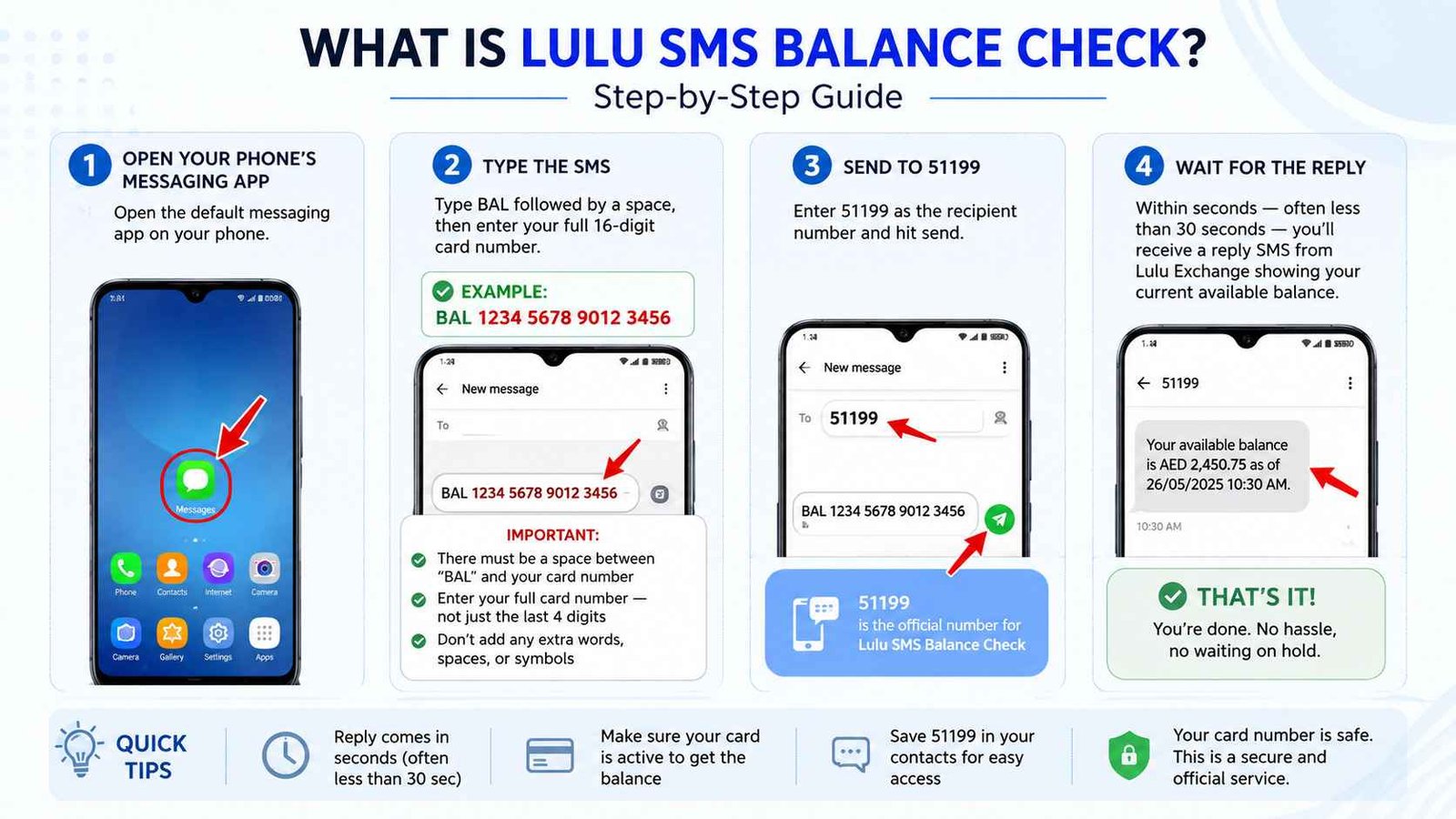
Lulu SMS Balance Check — BAL to 51199 Guide UAE
Want to check your Lulu salary card balance but don’t have the app or internet? Lulu Exchange’s SMS balance check service has you covered. Just send a simple text and you’ll get an instant reply with your available balance. Here’s exactly how it works.
Safety Note: UAEfinbiz is an informational guide only and does not have access to your Lulu card or account. Never share your card number, PIN, OTP, Emirates ID, or login credentials with any third-party website or individual. Always use official Lulu Exchange channels for balance checks. The official Lulu SMS service uses the shortcode 51199 — no other number should be used. For verified information, visit the official Lulu Money website at lulumoney.com . Lulu Exchange will never ask for your PIN or OTP via SMS. If you receive a suspicious message claiming to be from Lulu, ignore it and report it immediately.
What is Lulu SMS Balance Check?
Lulu Exchange offers a simple SMS service for all “My Pay My Card” salary cardholders. You send a short code to a specific number, and within seconds, you receive a reply with your available balance. No internet, no app download, no login — just your phone’s messaging app.
Think of it as your backup plan. Whether you’re in an area with no Wi-Fi, your phone has limited data, or you’re using a basic phone, SMS always works.
SMS Number: 51199
SMS Code: BAL [space] Full 16-digit Card Number
Charge: Approximately AED 0.30 per message (standard SMS rates apply)
Step-by-Step Guide
Step 1: Open Your Phone’s Messaging App
Open the default messaging app on your phone. Any phone works — whether you have the latest smartphone or an old-school keypad phone.
Step 2: Type the SMS
Type BAL followed by a space, then enter your full 16-digit card number.
Example:
BAL 1234 5678 9012 3456
Important:
- There must be a space between “BAL” and your card number
- Enter your full card number — not just the last 4 digits
- Don’t add any extra words, spaces, or symbols
Step 3: Send to 51199
Enter 51199 as the recipient number and hit send.
Step 4: Wait for the Reply
Within seconds — often less than 30 seconds — you’ll receive a reply SMS from Lulu Exchange showing your current available balance.
The reply typically looks something like this:
“Your available balance is AED X,XXX.XX as of [date/time].”
That’s it. You’re done. No hassle, no waiting on hold.
Who Can Use This Service?
The SMS balance check works for all Lulu “My Pay My Card” salary cardholders.
Important: Your UAE mobile number must be registered with Lulu Exchange. If you’ve recently changed your number, you’ll need to update it at any Lulu Exchange branch with your Emirates ID. Otherwise, the service won’t work.
Charges
Here’s what you’ll pay:
- SMS fee: AED 0.30 per message — this gets deducted from your mobile balance
- Bank charges: None — Lulu Exchange doesn’t charge extra for SMS balance enquiries
- International roaming: Charges may vary if you’re outside the UAE. Check with your mobile provider before using it abroad.
Troubleshooting
Sometimes things don’t go as planned. Here are common issues and how to fix them.
No reply received?
- Check your mobile network signal — you need at least basic coverage
- Make sure you sent to 51199, not any other number
- Ensure your mobile number is registered with Lulu Exchange
- Wait 1–2 minutes — network delays happen sometimes
Received “Invalid Request” message?
- You probably forgot the space between “BAL” and your card number
- You might have typed extra spaces or words
- Send again with exactly: BAL [your 16-digit card number]
Balance shows old amount?
- SMS shows real-time balance
- If your salary was credited today, wait 1–2 hours for the system to update
- Still wrong? Call Lulu Exchange at 600 526 526
Not receiving any SMS from Lulu at all?
- Your number might not be registered with Lulu Exchange
- Visit any Lulu Exchange branch with your Emirates ID to register your mobile number
- Or call 600 526 526 to verify your registered mobile number
Important Security Reminder
Here’s something you need to know. Lulu Exchange will never send you an SMS asking for your card number, PIN, OTP, or Emirates ID. Scammers sometimes pretend to be Lulu and ask for these details. Never reply to such messages — ignore them and report the number.
UAEfinbiz does not have access to your account. This is purely an informational guide. Always use official Lulu Exchange channels for your banking needs.
SMS vs App — Which One Should You Use?
| Situation | Best Method |
|---|---|
| Have smartphone + internet | Lulu Money App |
| No internet / basic phone | SMS BAL to 51199 |
| Need detailed transaction history | Lulu Money App |
| Quick balance check on the go | SMS or App |
Frequently Asked Questions
Is there a charge for Lulu SMS balance check?
Yes — approximately AED 0.30 per SMS. Your mobile provider deducts this from your prepaid balance or adds it to your postpaid bill.
Do I need to register for SMS balance check?
No — as long as your mobile number is registered with Lulu Exchange, you can send BAL to 51199 anytime. You don’t need to register separately.
What if I don’t receive the SMS reply?
Check your registered mobile number with Lulu Exchange by calling 600 526 526 or visiting a branch.
Can I use SMS balance check from outside the UAE?
Yes, but international SMS charges may apply. Check with your mobile provider first.
Is SMS balance check secure?
Yes — you’re only sending your card number, not your PIN or CVV. Just don’t reply to any suspicious messages asking for personal details.
What if I forgot my registered number?
Contact Lulu Exchange at 600 526 526. They’ll verify your identity and confirm the registered number.
One Comment