
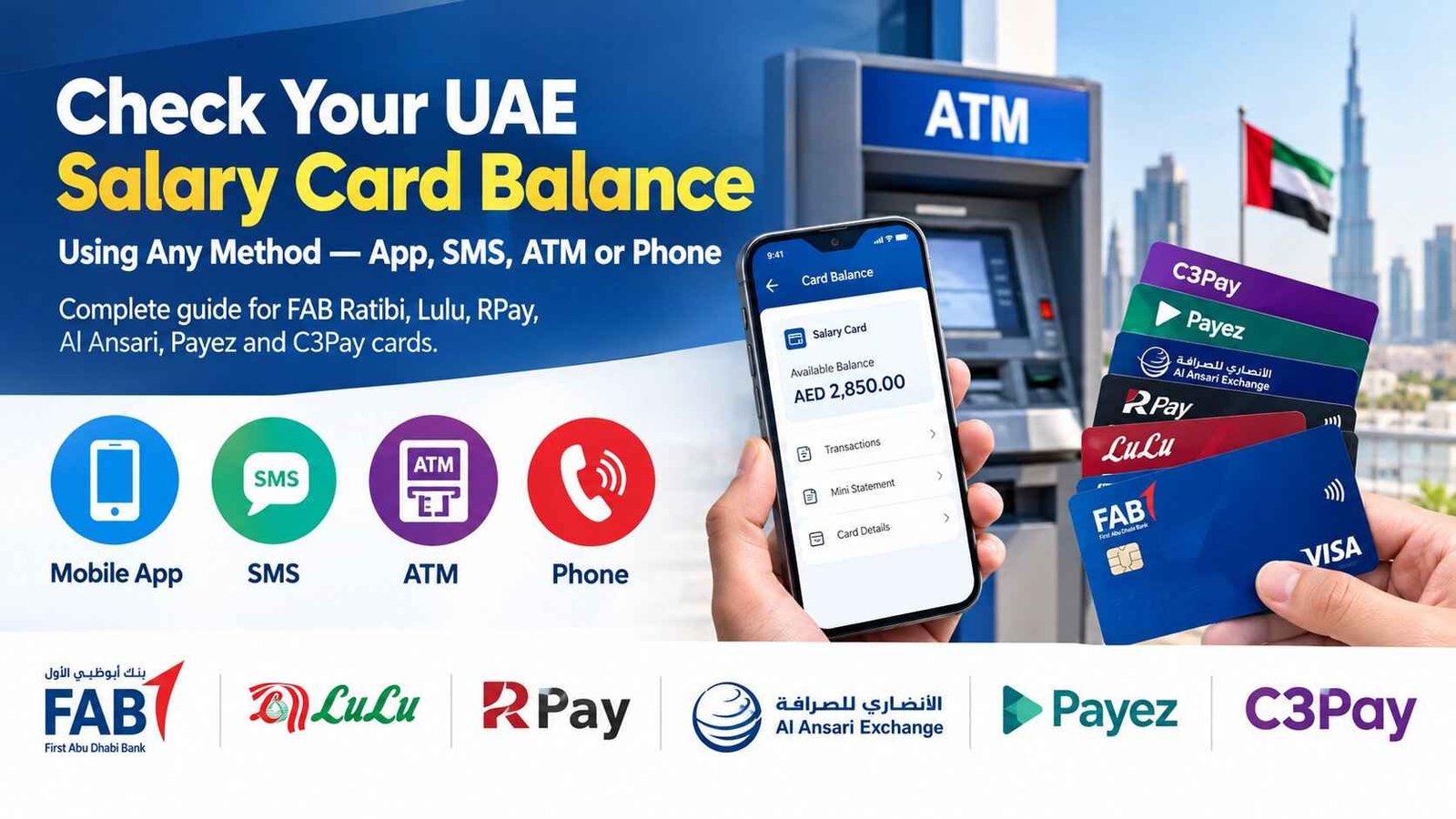
UAE Salary Card Balance Check — Complete Guide by Provider
Your salary just hit your card. You’re at the ATM, the grocery store, or trying to send money home. And you need to know exactly how much is on that card. Right now.
But here’s the problem: not all UAE salary cards work the same way. Some use apps. Some use SMS. Some work on Visa, others on Mastercard or Mercury. And if you’re using the wrong method, you’re either paying unnecessary fees or worse, entering your details on a website that shouldn’t have them.
This guide covers every major WPS salary card provider in the UAE: FAB, Lulu, RPay, Al Ansari, Payez, and C3Pay. For each one, you’ll find the fastest, cheapest, and most secure way to check your balance. No fluff. Just solutions.
Safety Note: UAEfinbiz is an informational guide only and does not have access to your salary card or account. Never share your full card number, PIN, OTP, Card ID, Emirates ID, or salary-card login on any third-party website. Always use official provider channels for balance checks. This includes the official app, ATM, IVR, SMS shortcode, branch, call centre, or official balance portal. If you receive any suspicious messages claiming to be from your bank or exchange house, ignore them and report immediately.
What is a WPS Salary Card?
A WPS (Wages Protection System) salary card is a prepaid card issued by UAE banks and exchange houses to pay employees who earn AED 5,000 or less per month. Employers load salaries directly onto the card, and employees can use it to withdraw cash at ATMs or make purchases without needing a traditional bank account.
There are two types of salary cards:
Open-loop cards (e.g., FAB Ratibi, Al Ansari PayPlus) run on major networks like Visa or Mastercard. They work at any ATM or point-of-sale terminal that accepts that network — worldwide .
Closed-loop cards (e.g., Al Ansari PayRoll) only work at the issuing provider’s own branches or ATMs. They’re simpler and cheaper but more restrictive .
Knowing which type you have helps you understand where you can use it and how to check your balance.
Quick Provider Directory: Choose Your Card
| Provider | Best Method | App / Portal | Phone / SMS |
|---|---|---|---|
| FAB (Ratibi) | Magnati prepaid portal | ppc.magnati.com/ppc-inquiry | 600 525 500 · BAL to 6667 |
| Lulu Exchange | Lulu Money app | lulumoney.com | 600 526 526 · BAL [card#] to 51199 |
| Al Rostamani (RPay) | ARIE app | Al Rostamani Int Exchange app | 600 540 004 |
| Al Ansari (PayPlus) | Al Ansari app | alansariexchange.com | 600 54 6000 · BAL to 600 54 6000 |
| Payez (Al Fardan) | AlfaPay app | alfardanexchange.com | 600 522265 |
| C3Pay (Edenred) | C3Pay app | edenred.ae | 600 56 7772 · BAL [last 4] to 4488 |
FAB Ratibi Card: Balance Check Methods
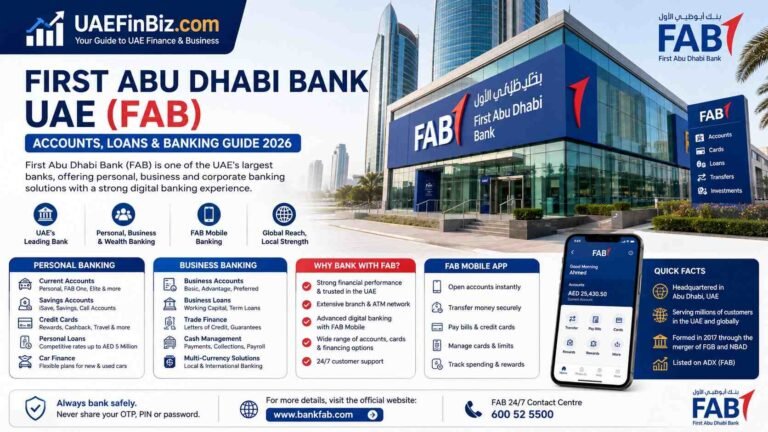
The FAB Ratibi card is one of the most widely used WPS salary cards in the UAE, processed through FAB’s subsidiary Magnati .
Method 1: Magnati Prepaid Card Enquiry Portal (Fastest)
This is the official balance enquiry portal for Ratibi and Magnati prepaid cards. No registration or login required .
How to check:
- Visit ppc.magnati.com/ppc-inquiry
- Enter the last four digits of your 16-digit card number
- Enter your Card ID — the 13-digit number printed on the back of your card
- Complete the captcha verification
- Click “Go” — your balance and recent transactions will appear instantly
Cost: Free.
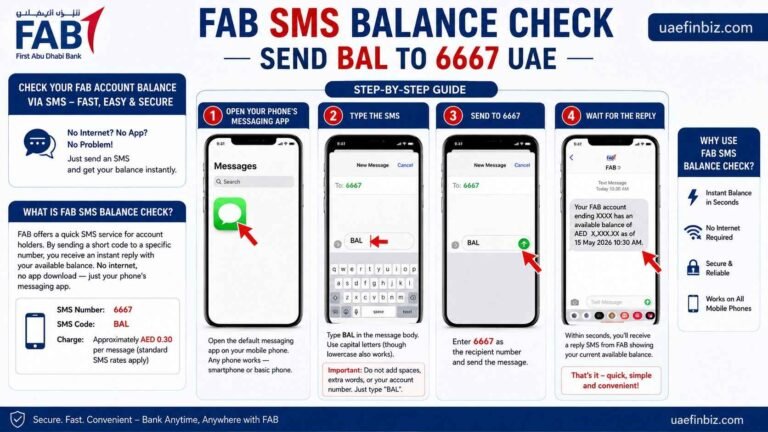
Method 2: SMS Balance Check
How to check:
Cost: Approximately AED 0.30 per SMS.
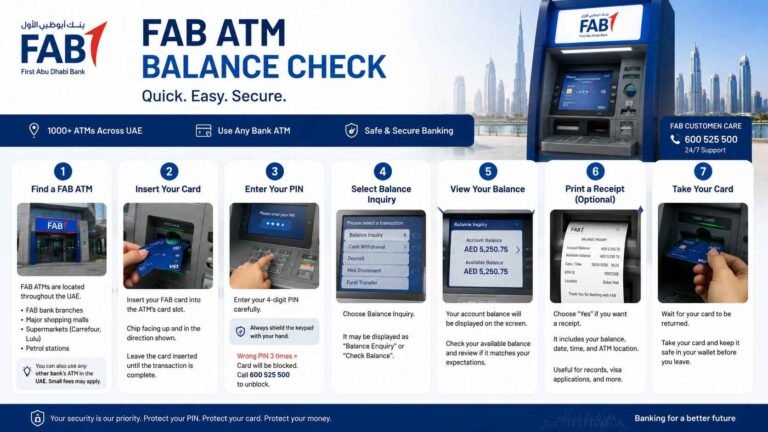
Method 3: ATM Balance Inquiry
How to check:
- Insert your Ratibi card into any FAB ATM
- Enter your 4-digit PIN
- Select “Balance Inquiry”
- View your balance on screen
Cost: Free at FAB ATMs. Other ATMs may charge AED 1–2 .
Method 4: Phone Banking
How to check:
Cost: Standard call rates apply.
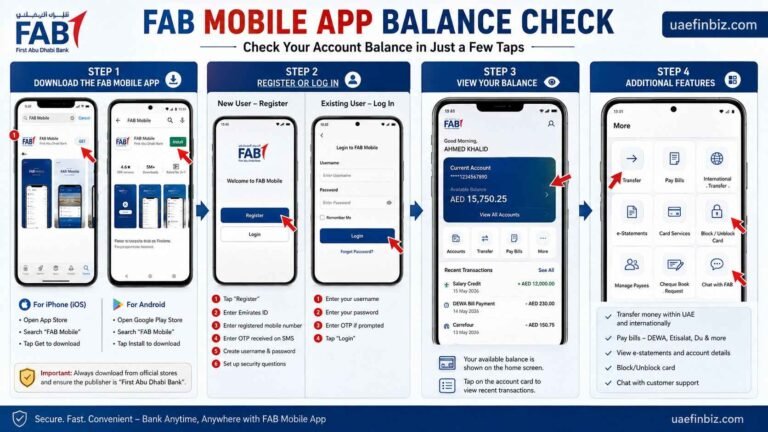
Method 5: FAB Mobile App
If you have linked your Ratibi card to the FAB Mobile app, you can check your balance on the home screen after login .
For more details: FAB Balance check Online
Lulu Exchange (My Pay My Card); Balance Check Methods
The Lulu “My Pay My Card” is a Mastercard-based WPS salary card with over 400,000 users in the UAE.
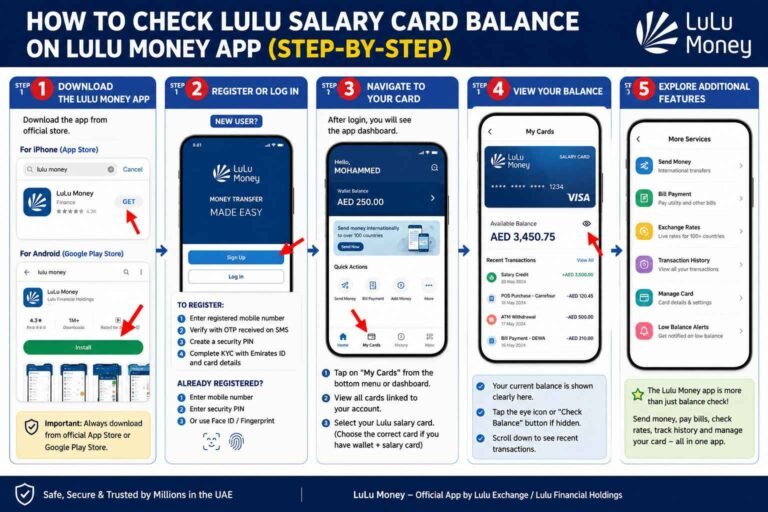
Method 1: Lulu Money App (Recommended)
How to check:
- Download the Lulu Money app from the App Store or Google Play
- Register with your registered mobile number and Emirates ID
- Go to “My Cards” on the dashboard
- Select your salary card — your balance appears instantly
Cost: Free.
Method 2: SMS Balance Check
How to check:
- Open your messaging app
- Type BAL followed by a space and your full 16-digit card number
- Send to 51199
- Receive your balance via SMS
Cost: Approximately AED 0.30 per SMS.
Method 3: Online Banking
How to check:
- Visit lulumoney.com
- Log in with your registered mobile number and OTP
- Your balance appears on the dashboard
Cost: Free.
Method 4: ATM Balance Inquiry
Lulu cards work at any ATM with the Mastercard logo. This includes Emirates NBD, Emirates Islamic, Mashreq, FAB, and RAKBank ATMs.
Cost: Free at Lulu Exchange branch ATMs. Other ATMs may charge AED 1–2.
Method 5: Phone Banking
Call 600 526 526 and follow the IVR prompts to hear your balance .
For more details check Lulu Exchange My Pay My Card details guide.
Al Rostamani (RPay) Balance Check Methods
The RPay card is Al Rostamani International Exchange’s WPS salary card, licensed by the Central Bank of the UAE.
Method 1: ARIE App (Recommended)
How to check:
- Download the Al Rostamani Int Exchange (ARIE) app from the App Store, Google Play, or Huawei AppGallery
- Register with your Emirates ID and RPay card details
- Log in and select “Balance Check” or “My Cards”
- Your balance will be displayed
Cost: Free. Unlimited balance checks .
Bonus: The ARIE app also supports C3Pay card balance checks — you can view both RPay and C3 balances in the same app .
Method 2: ATM Balance Inquiry
RPay cards work at ATMs of Emirates NBD, Emirates Islamic, FAB, and RAKBank. ARIE also deploys its own ATMs in large labour camps .
Cost: Free at partner ATMs. Fees may apply at non-partner ATMs.
Method 3: Phone Banking
Call 600 540 004 from within the UAE, or +971 4 454 3203 from outside. You can also call the toll-free number 800 4250 .
Check detail guide for Al Rostamani (RPay). Balance Check Methods.
Al Ansari (PayPlus); Balance Check Methods
The Al Ansari PayPlus card is issued via First Abu Dhabi Bank (FAB) and runs on the Visa network .
Method 1: Al Ansari Exchange App (Recommended)
How to check:
- Download the Al Ansari Exchange app from the App Store, Google Play, or Huawei AppGallery
- Register or log in using your credentials or UAE PASS
- Navigate to “My Cards”
- Select your PayPlus card and tap “View Balance”
Cost: Free.
Method 2: SMS Balance Check
How to check:
Cost: Standard SMS charges apply.
Method 3: Online Portal
How to check:
- Visit alansariexchange.com
- Click “Send Money Online” and select “Individual Login”
- Sign in and navigate to the card section
- Select your PayPlus card and click “Check Balance”
Cost: Free.
Method 4: ATM Balance Inquiry
PayPlus cards work at any ATM that accepts Visa. You get 2 free balance checks per month at FAB ATMs . Other ATMs may charge AED 2 + VAT.
Method 5: Phone Banking
Call 600 54 6000 (available 24/7) and follow the IVR prompts .
Check the Detail guide for Al Ansari balance check methods.
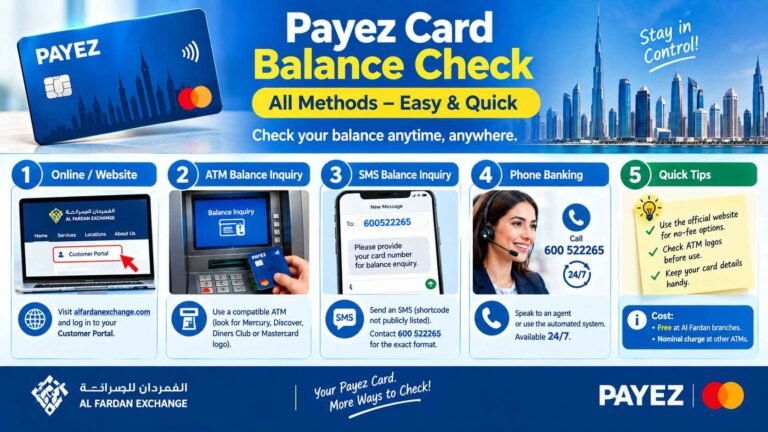
Payez (Al Fardan Exchange): Balance Check Methods
The Payez card from Al Fardan Exchange was the first WPS-compliant payroll card launched in the UAE (2009) . Al Fardan offers two versions: Payez Mercury and Payez Mastercard.
Method 1: AlfaPay App (Recommended)
How to check:
- Download the AlfaPay app by Al Fardan Exchange
- Register with your registered mobile number
- Tap “Card Details” to view your balance and transactions
Cost: Free.
Method 2: Customer Portal
Visit alfardanexchange.com and log in to the Customer Portal to view your balance.
Cost: Free.
Method 3: ATM Balance Inquiry
- Payez Mercury: Works at ATMs with Mercury or Discover/Diners Club logos
- Payez Mastercard: Works at any ATM with the Mastercard logo
Cost: Free at Al Fardan Exchange branches. Nominal charge at other ATMs.
Method 4: Phone Banking
Call 600 522265 (available 24/7) and follow the IVR prompts for balance enquiry.
for more details check our detail guide for Payez balance check methods.
C3Pay (Edenred): Balance Check Methods
The C3Pay card is issued by Edenred UAE with RAKBANK BIN sponsorship .
Method 1: C3Pay App (Recommended)
How to check:
- Download the C3Pay app from the App Store or Google Play
- Register with your Emirates ID
- Log in and view your balance and transactions
Cost: Free.
Method 2: SMS Balance Check
How to check:
- Type BAL followed by the last 4 digits of your card number
- Send to 4488
- Receive your balance via SMS
Cost: Standard SMS charges apply.
Method 3: ATM Balance Inquiry
C3Pay cards work at ATMs across the UAE. Check for the network logo on your card.
Cost: Free at partner ATMs. Other ATMs may charge AED 1–2.
Method 4: Phone Banking
Call 600 56 7772 and follow the IVR prompts .
Check our detail guide for C3Pay.
Comparison Table: All UAE Salary Card Methods
| Card | App | SMS | ATM | Phone | Best Free Method |
|---|---|---|---|---|---|
| FAB Ratibi | FAB Mobile | BAL to 6667 | ✓ | 600 525 500 | Magnati Portal |
| Lulu My Pay | Lulu Money | BAL [card#] to 51199 | ✓ | 600 526 526 | Lulu Money App |
| RPay | ARIE | — | ✓ | 600 540 004 | ARIE App |
| Al Ansari PayPlus | Al Ansari | BAL to 600 54 6000 | ✓ | 600 54 6000 | Al Ansari App |
| Payez | AlfaPay | — | ✓ | 600 522265 | AlfaPay App |
| C3Pay | C3Pay | BAL [last 4] to 4488 | ✓ | 600 56 7772 | C3Pay App |
FAQ’s
How do I check my UAE salary card balance?
The method depends on your card provider. Most cards support balance checks via their official app, SMS, ATM, or phone banking. Check the provider directory above for your specific card.
Which salary card balance check is free?
App-based balance checks are free for all major providers (FAB Ratibi via Magnati portal, Lulu Money app, ARIE app, Al Ansari app, AlfaPay app, C3Pay app). SMS balance checks typically cost around AED 0.30 per message. ATM balance checks are free at the issuing provider’s ATMs but may cost AED 1–2 at other banks’ ATMs.
Can I check my salary card balance without internet?
Yes. You can use SMS balance check (send BAL to your provider’s shortcode), visit an ATM, or call your provider’s phone banking number. All of these work without an internet connection.
Why is my salary not showing on my card?
Salary credits through WPS can take 24–48 hours after your employer processes payroll. If it’s been longer, contact your HR department first to confirm the salary was processed. If they confirm it was, call your card provider’s customer support.
What is the difference between open-loop and closed-loop salary cards?
Open-loop cards (e.g., FAB Ratibi, Al Ansari PayPlus) run on Visa or Mastercard networks and work at any ATM or POS terminal worldwide. Closed-loop cards (e.g., Al Ansari PayRoll) only work at the issuing provider’s own branches or ATMs.
How do I identify which salary card I have?
Look at the logo on your card. Visa or Mastercard logos indicate open-loop cards. Check the card issuer name (FAB, Lulu Exchange, Al Rostamani, Al Ansari, Al Fardan, Edenred) to identify your provider.
Is there a fee for checking my balance at an ATM?
Balance checks are free at your card issuer’s ATMs. Other banks’ ATMs may charge AED 1–2 per inquiry. For example, FAB charges AED 1.05 for non-FAB ATM balance inquiries, and Al Ansari charges AED 2 + VAT at non-FAB ATMs.
What should I do if my salary card is lost or stolen?
Call your card provider’s customer support immediately. For FAB Ratibi, call 600 525 500. For Lulu, call 600 526 526. For RPay, call 600 540 004. For Al Ansari, call 600 54 6000. For C3Pay, call 600 56 7772. They will block your card and arrange a replacement.
4 Comments